How to Play Ticket to Ride Online
Play Ticket to Ride online or try a free browser alternative with no account. Compare ways to play with friends, against bots, and on a phone.
By the Tavernly team · · Updated

Ticket to Ride, designed by Alan R. Moon and released by Days of Wonder in 2004, won that year's Spiel des Jahres. You can play Ticket to Ride online through Board Game Arena or the official Steam and phone apps. We make Milehollow on Tavernly, a free browser alternative.
The short answer
- Free alternative with friends and no account: Milehollow on Tavernly. Start a private table; share its link.
- The official game: Paid apps on Steam, the App Store and Google Play.
- In the browser: Board Game Arena is free to join; hosting may need Premium.
Which way is right for you?
Use the table to choose where to play, then follow that option's setup steps below. Before starting, check the access requirements and any costs for the option you choose. The rules recap describes Milehollow's map and numbers for our browser game.
| You want to... | Best choice |
|---|---|
| Friends on BGA | Board Game Arena: free accounts join; hosting may need Premium |
| Friends free, no account | Milehollow: private-table link |
| Computer opponents | Official app or Milehollow |
| Official expansions | Official app; expansions cost extra |
| Learn | BGA tutorial, recap below, or Milehollow's Read the rules |
| Phone | Official app: App Store or Google Play |
Board Game Arena: Ticket to Ride in your browser (free to join)
Ticket to Ride on Board Game Arena runs in your browser with no download. Its listing gives 2 to 5 players and about 10 minutes per game. Joining requires a free account. Before you host for friends, check BGA's Premium table rules.
You need: A browser and BGA account.
- Open the game page. Visit the Ticket to Ride game page.
- Join a table. Sign in with your free BGA account.
- Check hosting access. For a friends' table, check whether BGA asks for Premium; see BGA's FAQ.
- Find the tutorial. The game page lists one.
Other BGA games include Ticket to Ride: Europe and a Ticket to Ride map collection.
Ticket to Ride by Marmalade Game Studio: the official app (paid)
Marmalade Game Studio's paid app offers Windows and Mac versions, single-player, online PvP and cross-platform multiplayer on Steam. Phone apps on the App Store and Google Play have in-app purchases. The App Store lists computer opponents, couch mode for passing one device, matchmaking and private games.
You need: The paid app; online features in the App Store version require login.
- Choose your download. Get Steam, App Store or Google Play.
- Choose a mode. Use single-player, online multiplayer or the App Store version's couch mode.
- Log in for online play. The App Store listing requires this for online features.
- Check prices before buying. Expansions cost extra.
Steam's 14 November 2023 release listed $14.99, discounted 70% to $4.49 when checked; Europe Expansion was $9.99. App Store expansions, map packs and bundles: $3.99 to $49.99. Google Play's price: not checked.
A Ticket to Ride alternative: Milehollow on Tavernly
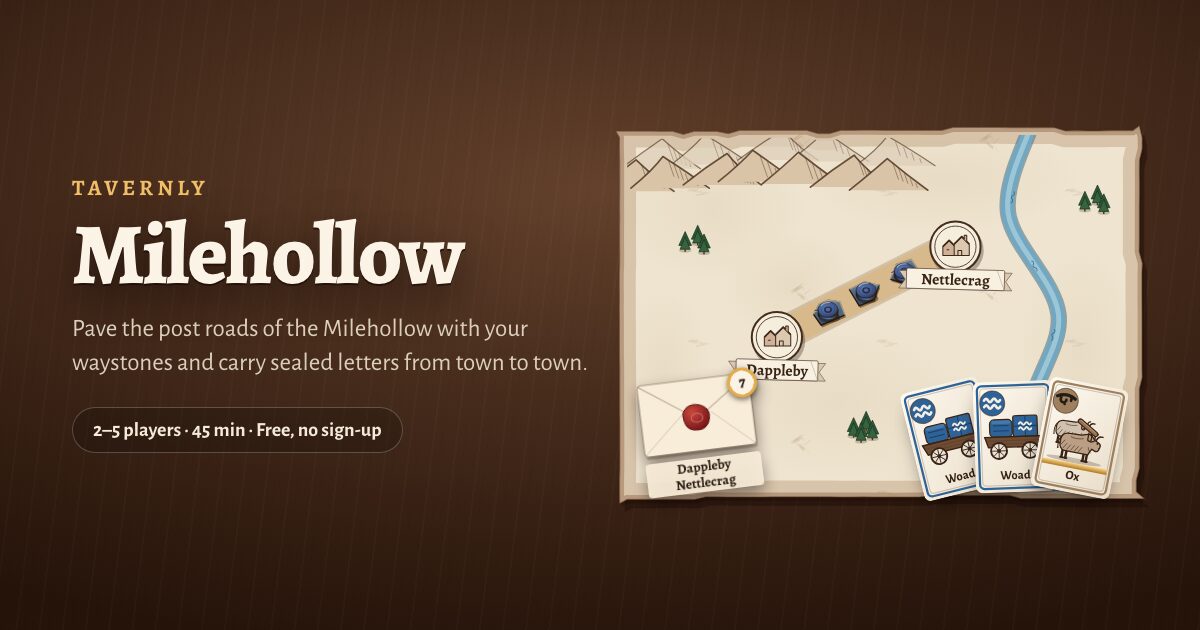
Milehollow on Tavernly is free for 2 to 5 players, with no account, download or Premium. Pave roads across our map to connect towns on your sealed letters, the game's secret goals. Play against bots or with friends; there are no expansions or guided lesson.
You need: A browser; enter your birth date on your first visit. Tavernly is for ages 13 and over.

- Play against bots. Under Opponents, choose 1, 2, 3 or 4; under Bots, choose Easy, Medium or Hard. Medium is preselected; press Play now.
- Open a friends' table. Press Play with friends, choose 2 to 5 under Seats at the table, then Start a private table. Send the link with Share invite, then press Start now: bots take the empty seats.
Bots take empty seats within five seconds, the page says.
Learn by playing
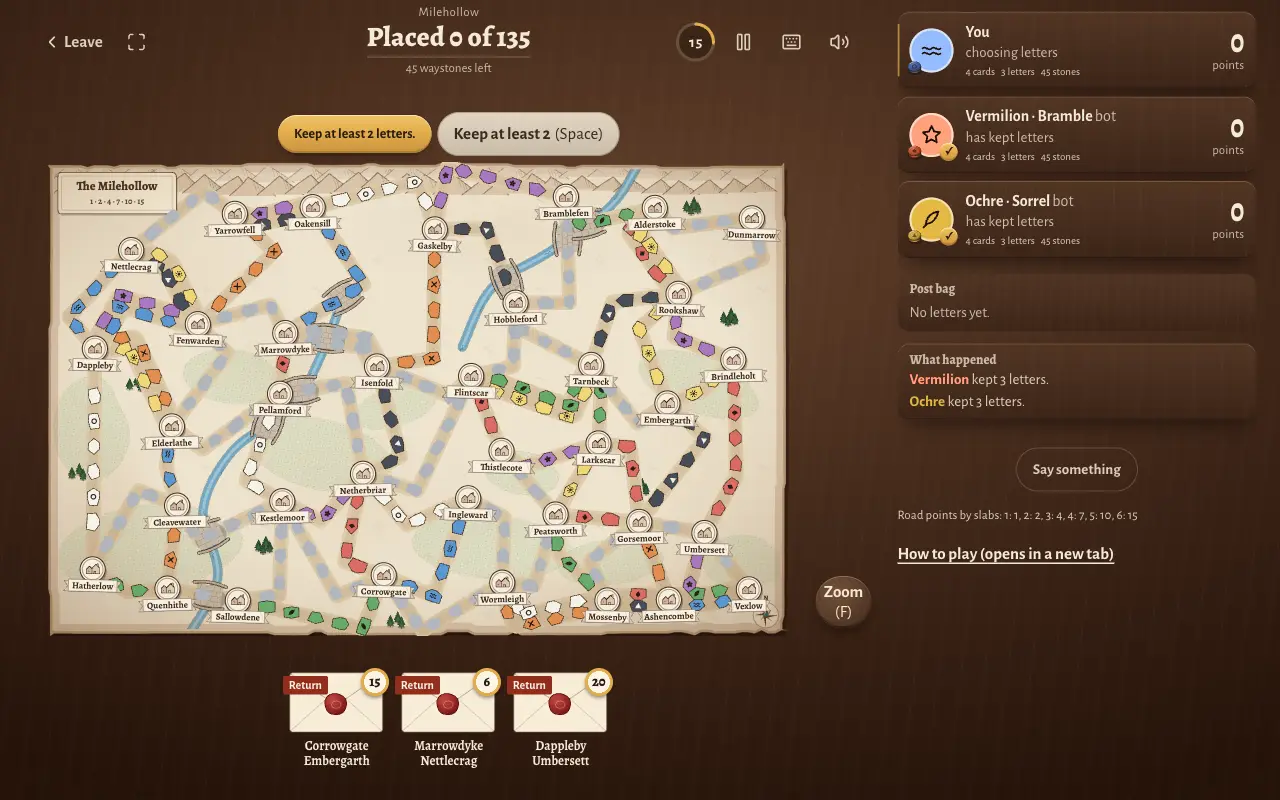
- Keep your starting letters. Our table opened with Keep at least 2 letters. Select your letters and press Keep at least 2 (Space); they appear in Post bag.
- Read your turn prompt. We then saw Your turn: pave, take 2 cards, or draw letters. Your hand sits below the map; Zoom (F) enlarges the map.
- Check the move log. What happened records moves; the seat rail shows points, cards, letters and stones, with bots marked bot.
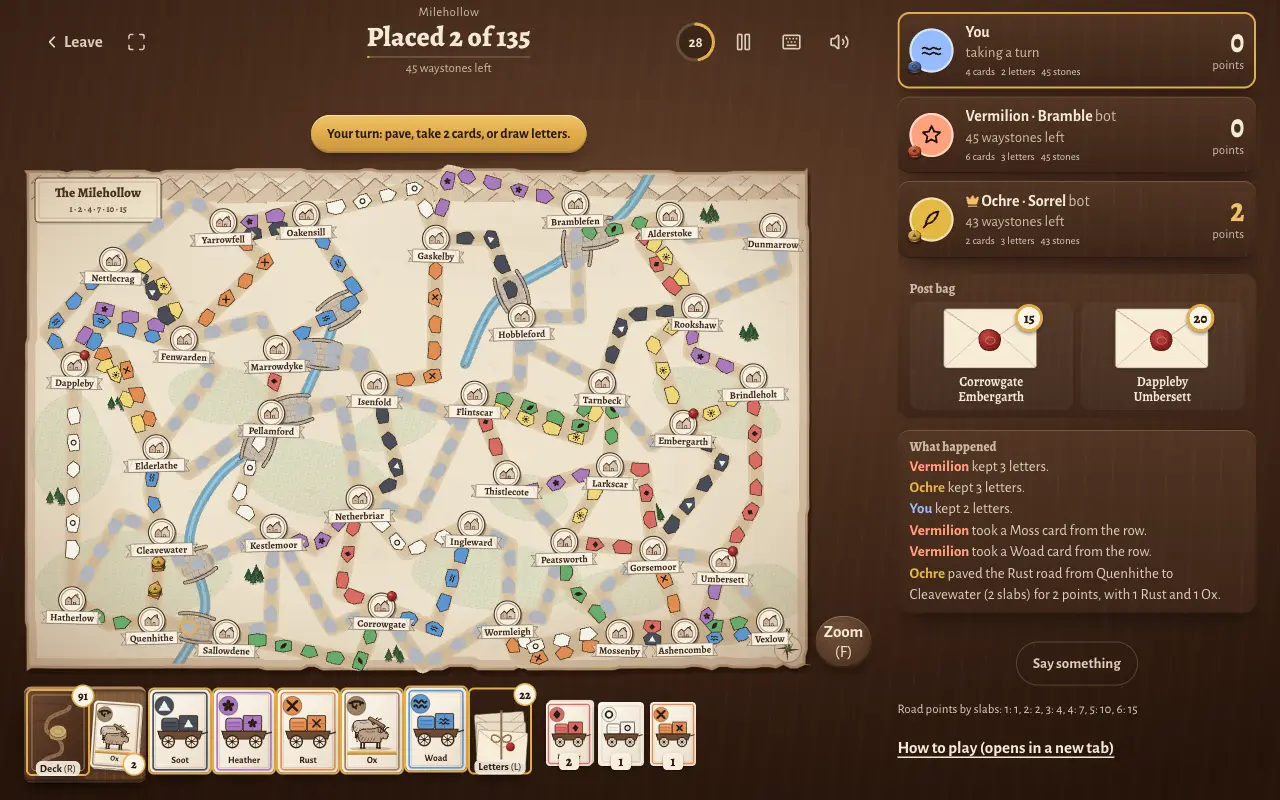
Cards have colours and carved signs. Help: Read the rules or How to play (opens in a new tab).
| Recap words | Milehollow's names |
|---|---|
| wild card (any colour) | Ox |
| secret goal card | sealed letter |
The rules in two minutes
Each Milehollow seat starts with 45 playing pieces and 4 colour cards; 5 shared cards are face-up. Draw 3 secret goal cards and keep at least 2 before play. Goals name two towns to connect; the first seat is random.
Your turn. Play clockwise. Choose one action:
- Draw cards. Take 2, one at a time, from the face-up row or deck, replacing face-up cards immediately. A face-up wild must come first and uses your whole draw; a deck wild counts as 1.
- Claim a road. Pay one matching colour card per slab (road space); grey roads take any one colour, and wilds substitute. Fill the unclaimed road's slabs with pieces and score immediately.
- Draw letters. Draw 3 goals and keep at least 1; return the others under their deck.
Road points. Roads need not connect to yours.
| Road length in slabs | Points |
|---|---|
| 1 | 1 |
| 2 | 2 |
| 3 | 4 |
| 4 | 7 |
| 5 | 10 |
| 6 | 15 |
- Check double roads. You cannot claim both roads between the same towns. With 2 or 3 seats, claiming one closes its partner; otherwise different seats can claim each.
- Score your hidden letters at the end. Add each value if your roads connect its towns; otherwise subtract it.
- Award the Long Road bonus. The longest unbroken path earns 10 points, counted in slabs. Count only your roads, each once; tied seats all receive it.
- Take the final round. End a turn with 2 or fewer pieces: everyone gets one more turn, including you. Pass if unable to act.
- Break score ties. Highest final score wins; ties go to most delivered letters (completed goals), then the Long Road. Remaining ties share the place.
Tips for playing online
These tips use the Milehollow numbers above, including road lengths and scoring. Rules differ a little between editions and our own map. If you own the box, check its rulebook before using this recap for that edition.
- Check letters. Unconnected towns cost points.
- Plan wild-card draws. Face-up wilds use the whole draw.
- Compare lengths. A 6-slab road earns 15 points; two 3-slab roads earn 8 for the same pieces.
- Watch double roads. With 2 or 3 seats, their partners close.
- Watch pieces. Finishing with 2 or fewer starts the final round.
Questions people ask
These answers cover access, devices, group size and timing. Check platform listings before buying or hosting. For Milehollow, the setup steps show how to open a table, and the rules recap explains the choices you make.
Can I play Ticket to Ride online for free?
Board Game Arena needs a free account; hosting may need Premium, so check before opening a table. The official apps are paid. Our alternative, Milehollow on Tavernly, is free with no account or Premium; share its private-table link with friends.
Do I need to download anything?
Board Game Arena runs Ticket to Ride in your browser; there is no download. Milehollow on Tavernly runs in your browser. The official app is a download from Steam, or from the App Store or Google Play for a phone.
Can I play Ticket to Ride with friends online?
Free BGA accounts can join; hosting may need Premium. The App Store lists private games and requires login for online features. In Milehollow, press Play with friends, open a private table and use Share invite to send friends the link.
Can I play Ticket to Ride alone?
The App Store app offers computer opponents; Steam lists single-player. In Milehollow, choose Easy, Medium or Hard bots and an opponent count before Play now; Medium is preselected. A quick game starts with you and two bots at the table.
How many people can play?
BGA lists Ticket to Ride for 2 to 5 players; Milehollow has 2 to 5 seats. A quick game starts with 3: you and two bots. For friends, choose your table's seat count; bots fill any seats that stay empty.
Can I play Ticket to Ride on my phone?
Marmalade Game Studio's official app is on the App Store and Google Play. The App Store price was $4.99 on 5 October 2026, with in-app purchases. Google Play lists in-app purchases; check its store page for the price before buying.
How long does a game take?
BGA lists a typical Ticket to Ride game at about 10 minutes. Milehollow takes about 45 minutes, with 60 seconds per decision. Those timings describe different games; use the listing for your chosen option when planning a game with friends.
What happens when my timer runs out?
In Milehollow, you have 60 seconds per decision. When time runs out, the table draws cards from the deck for you. It paves a road only when nothing can be drawn, keeping the game moving if a player is away.
Sources
We did not test the apps' online play or Board Game Arena while logged in.
- Wikipedia, Ticket to Ride (board game): designer, publisher, release year and award.
- Board Game Arena, Ticket to Ride: browser play, player count, typical game time, tutorial, other listed games and the Premium caution.
- Board Game Arena FAQ: the link for BGA's Premium table rules.
- Steam, Ticket to Ride: Marmalade Game Studio, release date, platforms, prices, play modes and the separately sold expansion.
- App Store, Ticket to Ride: price, in-app purchases, computer opponents, couch mode, private games and online login.
- Google Play, Ticket to Ride: the listing and its in-app purchases. Its price was not checked.
- Milehollow on Tavernly: our rules, seats, timer, bot levels, table labels and play options.
Milehollow is not affiliated with or endorsed by the owner of Ticket to Ride. Ticket to Ride is a trademark of its owner. As an Amazon Associate we earn from qualifying purchases. If you want the physical game, here is Ticket to Ride on Amazon.