How to Play Gaia Project Online
By the Tavernly team ·
Gaia Project is a strategy game by Jens Drögemüller and Helge Ostertag, published by Feuerland Spiele. You can play it online on Board Game Arena or in the official DIGIDICED app on Steam and phones. We make Lumenreach, a free browser game with its own rules, and we say so here: Lumenreach on Tavernly is our alternative.
The short answer (checked 7 October 2026)
- Gaia Project in a browser: Board Game Arena is free to join, hosting may need Premium.
- The official app: DIGIDICED offers Gaia Project on Steam, the App Store and Google Play.
- A free alternative with no account: Lumenreach on Tavernly has bots, a coach and private tables for friends.
Which way is right for you?
The listings were checked on 7 October 2026. Prices change, and they vary by region and store, so check the page before you pay.
| You want to | Where to look |
|---|---|
| Play with friends with the official rules | Board Game Arena |
| Play with friends, free, with no account | Lumenreach on Tavernly |
| Play alone against the computer | The official DIGIDICED app or Lumenreach on Tavernly |
| Own the official game on a device | Steam, App Store or Google Play |
| Learn while you play | Lumenreach on Tavernly, with “Learn by playing”, or the rules recap below |
| Play on a phone | Lumenreach on Tavernly in the browser or the App Store app |
Board Game Arena: Gaia Project in your browser (free to join)
Board Game Arena hosts Gaia Project in a browser, with no download. Its page lists 1 to 4 players and an average game time of 60 minutes. It is free to join, hosting may need Premium. Check the game page for the current terms before you plan a table.
- Open the Gaia Project page on Board Game Arena.
- Create a free account or sign in to your account.
- Check the page’s current Premium terms if you want to host.
- Join a table, or host a table for friends under those terms.
BGA lists the game’s complexity as 4 out of 5. Its release on the site was 14 December 2021.
Gaia Project by DIGIDICED, the official app (paid)
DIGIDICED develops and publishes the official digital game. On Steam, Gaia Project runs on Windows, macOS and Linux. The USD list price is $24.99. On 7 October 2026, the page showed $9.99 in a 60% sale.
Steam lists single-player, online PvP, cross-platform multiplayer, shared or split screen, Remote Play Together and Steam Turn Notifications. These are listing claims.
The US App Store page lists $3.99 for iPhone and iPad, with iOS 14.0 or later. It describes AI opponents, online lobby games and local play. Version 2.8 was updated on 23 April 2026.
Google Play lists the official digital version. Its price was not confirmed.
- Choose Steam, the App Store or Google Play for your device.
- Check the current price and device requirements, then buy and install the app.
- Choose single-player to play alone. For online play, use the multiplayer options described by your store listing.
A Gaia Project alternative: Lumenreach on Tavernly
A Gaia Project alternative that runs in your browser is Lumenreach on Tavernly. It is free and needs no sign-up. It has its own art, names and rules, with 14 clans and 2 to 4 players. You can play with bots or friends.
You can start with bots in seconds: they take empty seats within five seconds and are always marked as bots. Friends join by link. Each decision has a 90-second timer. If it runs out, the table passes for you and takes only free draws.
Lumenreach on Tavernly runs in a phone browser. Tap the sea to look closer, use the arrows at its edges to move the view, and tap Whole sea to see it all. The mat, crafts, actions and goals are in tabs.
Lumenreach on Tavernly has no expansions and no play by mail over days. A game lives on the server, so the table closes if the server restarts.

- Play now: Open Lumenreach on Tavernly. Choose 1, 2 or 3 opponents and an Easy, Medium or Hard bot level. The defaults are 2 opponents and Medium. Tavernly asks for your birth date once because it is for players aged 13 and over.
- Learn by playing: Choose this button to start a real game with a coach.
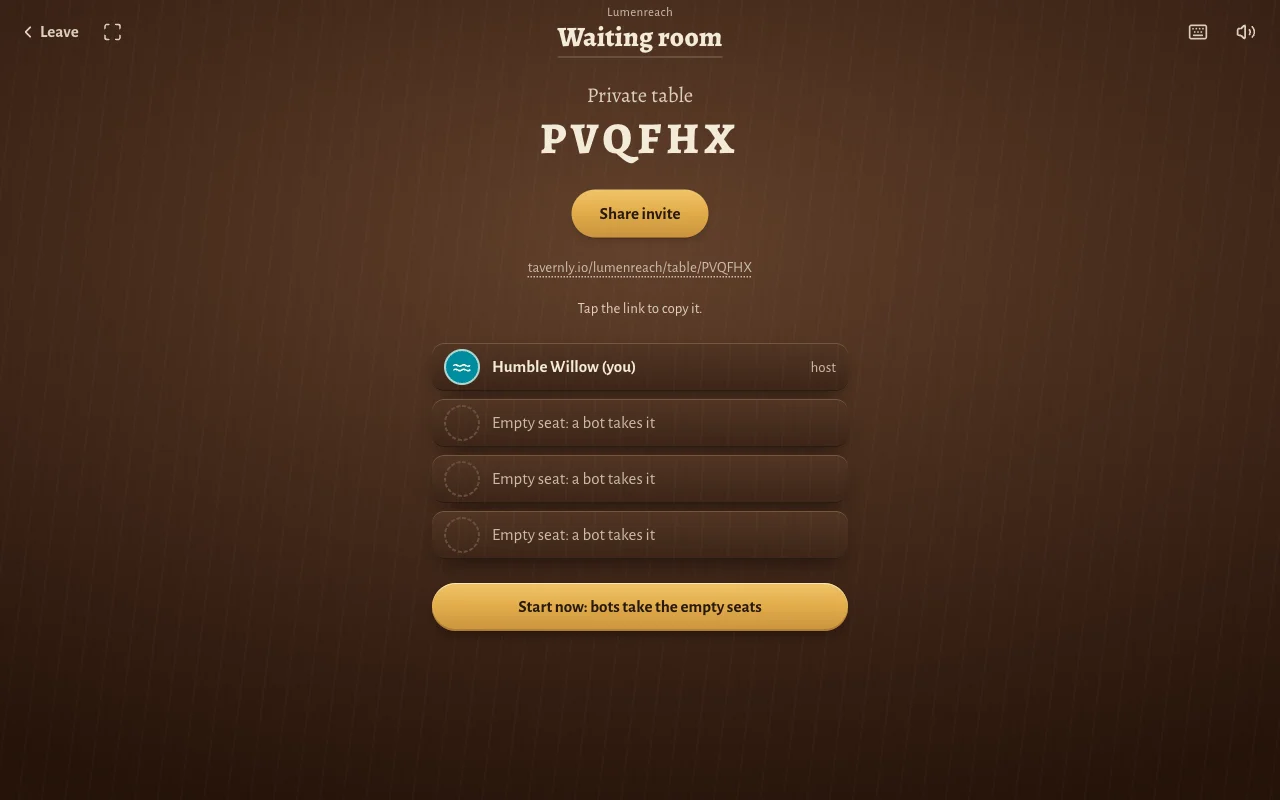
- Play with friends: Choose 2, 3 or 4 seats, then press Open a private table. The default is 4 seats. Use Share invite to send the link. Friends join in the browser without accounts. When they are in, press Start now: bots take the empty seats.
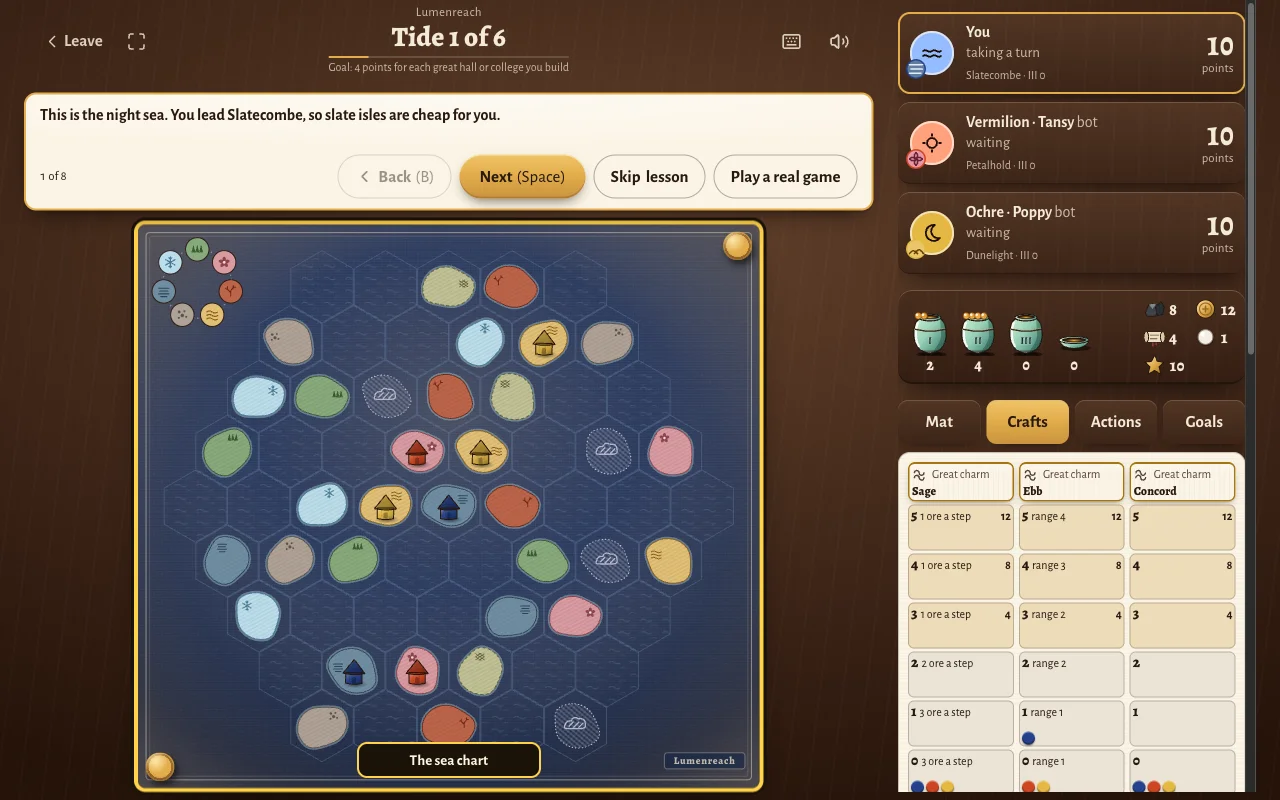
What "Learn by playing" teaches
“Learn by playing” starts a real game on Tide 1 of 6, with a coach box at the top. The “One turn” lesson has 8 steps. The coach has Back (B), Next (Space), Skip lesson and Play a real game buttons.
Step 1: know your home kind. The coach says: “This is the night sea. You lead Slatecombe, so slate isles are cheap for you.”
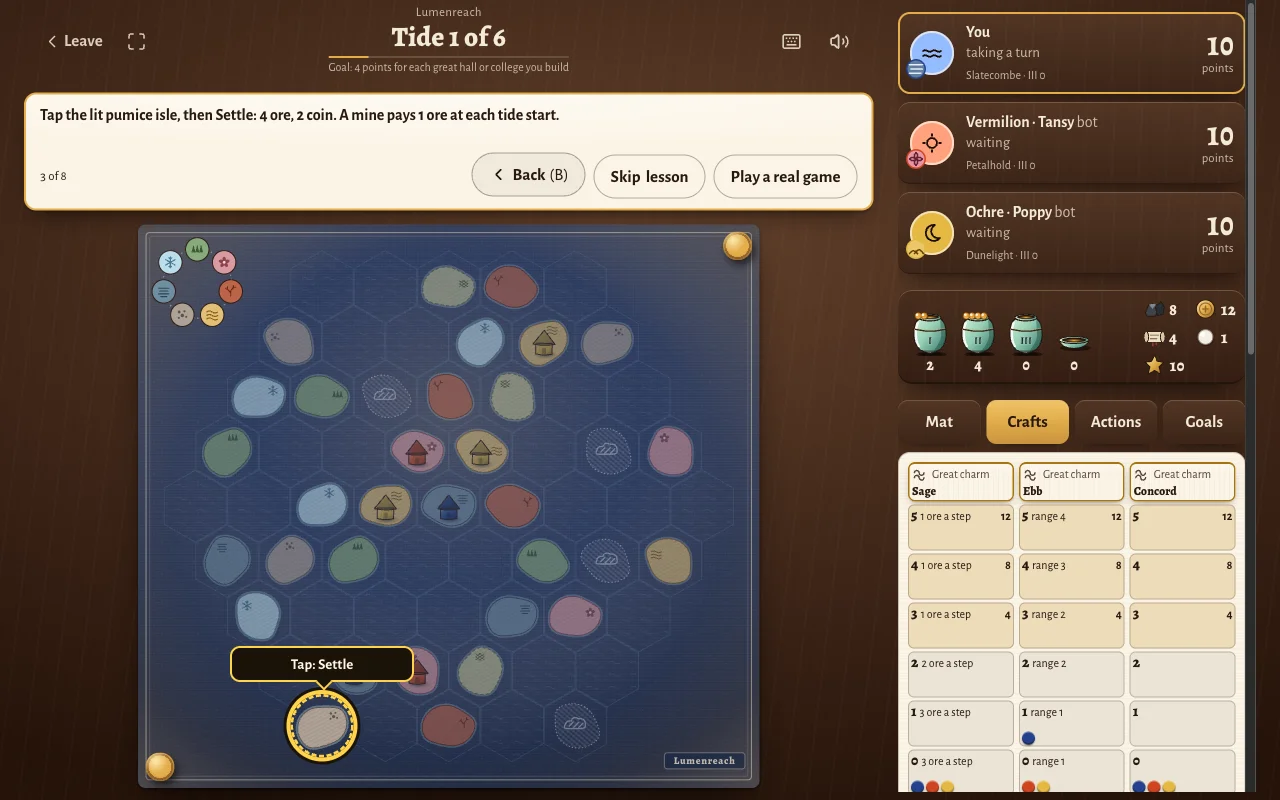
Step 3: build a mine. The coach says: “Tap the lit pumice isle, then Settle: 4 ore, 2 coin. A mine pays 1 ore at each tide start.”
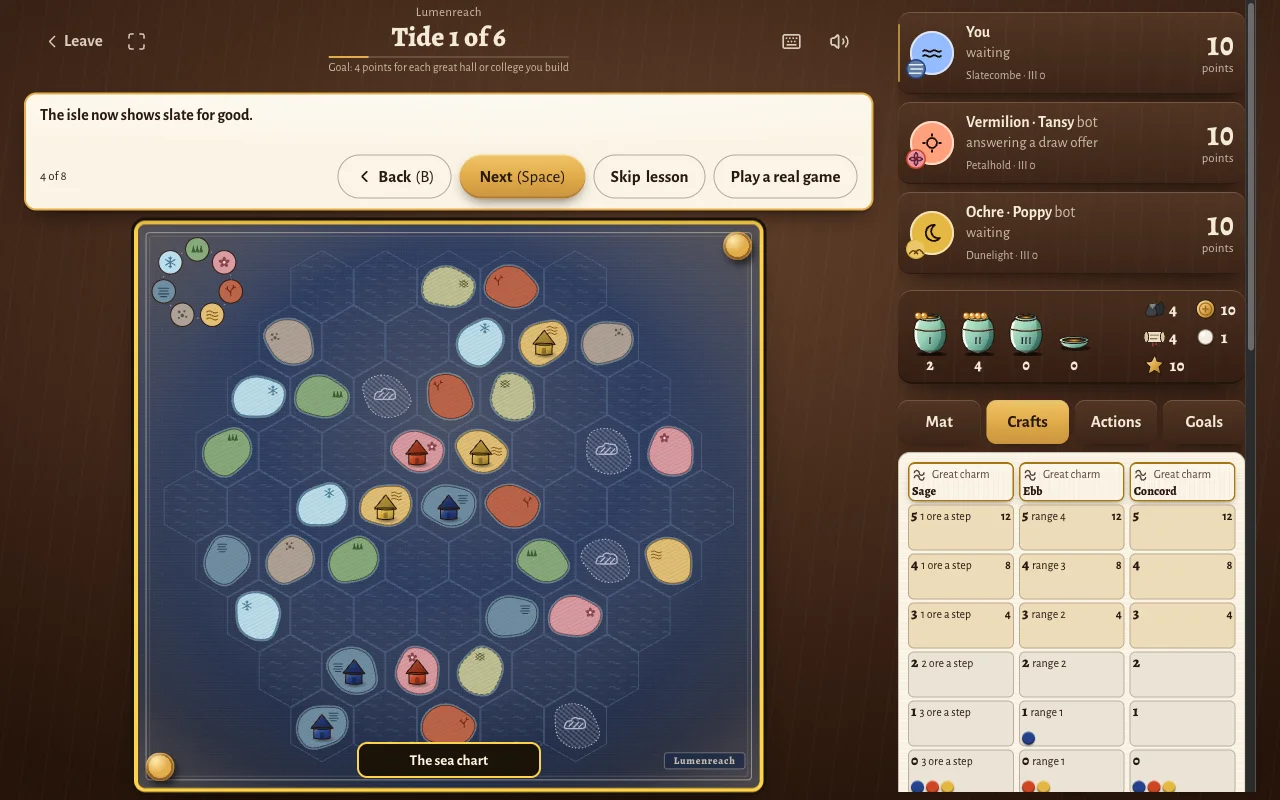
Step 4: see the change. The coach says: “The isle now shows slate for good.” Ore falls from 8 to 4, and coin from 12 to 10.
Step 6: watch the jars. Petalhold’s nearby mine may draw 1 glow for free after your new mine. The coach says: “Building near a rival feeds that rival's jars, so choose your place with care.”
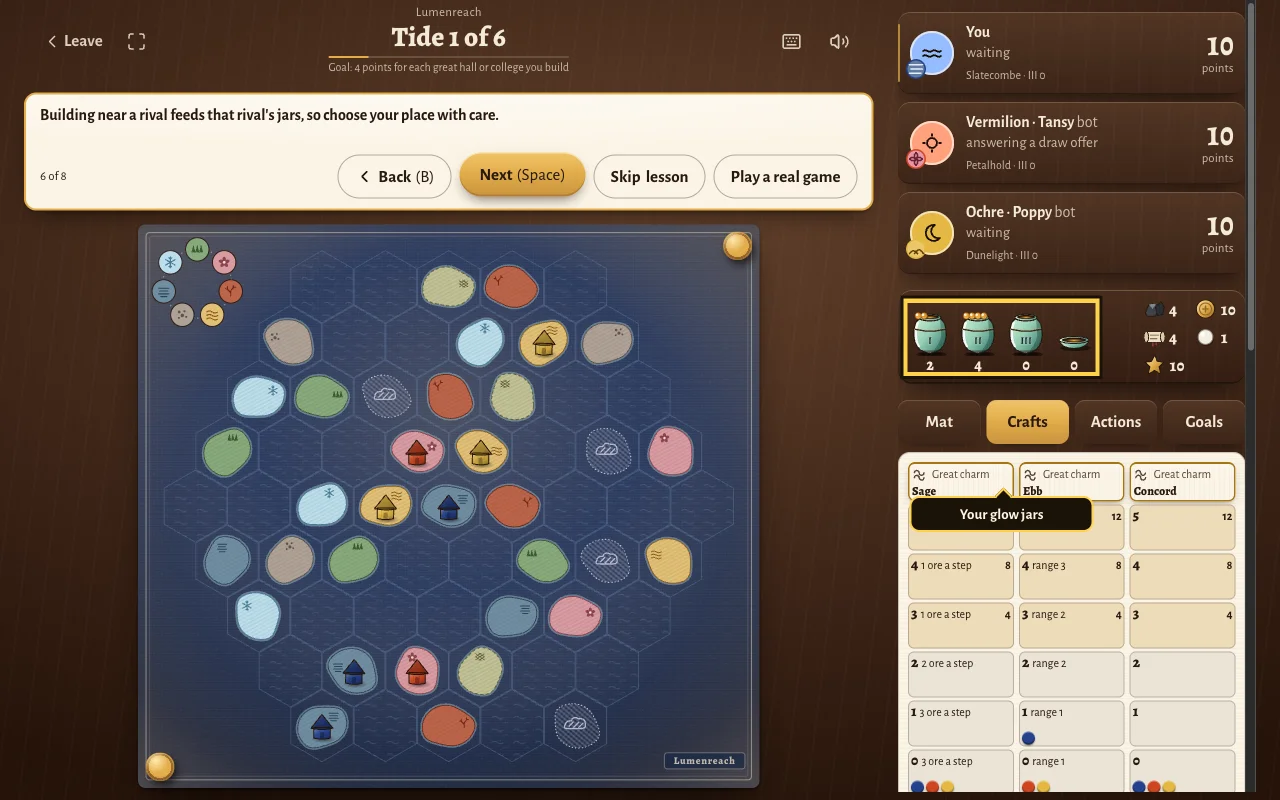
Step 7 explains that you get one main action each turn. The tide continues until every clan passes. Other lessons cover glow jars, leagues, upgrades, tenders, crafts, charms, powers and the final count.
These plain words match the names used in our game:
| Plain word | Lumenreach's name |
|---|---|
| planet | isle |
| faction | clan |
| terraforming | shaping |
| round | tide |
The rules in two minutes
This recap covers our version, Lumenreach on Tavernly.
The goal. Build on the sea chart and earn points. You start with 10 points. The most points wins, and equal points share the place.
Setup. Players choose from 14 clans, two for each home kind. No two seats share a home kind. Each seat places two start mines on free isles of its home kind. Some clans start with a third mine or a great hall. Each seat then takes a wind.
Six tides. Each tide starts with income for everyone: 1 ore and 1 lore, plus income from the mat, crafts, charms and wind. A tide ends when every seat passes. Pass order sets the next tide’s turn order.
A turn. Take exactly one main action. Free actions, such as exchanges and burning glow, can come before it. They can also come after it if you keep the turn open.
Main actions:
- Settle: build a mine on a free isle within range.
- Upgrade: change a mine to a market, a market to a library or great hall, or a library to a college.
- Tend: send a free tender to a mist isle in range. It becomes drift at the next tide start. You cannot tend in tide 6.
- Craft: move up a craft track.
- League: connect buildings and lantern posts.
- Use a glow action, pearl action or special action.
- Pass: stop taking turns this tide. You still receive draw offers.
Building costs. A mine costs 1 ore and 2 coin, plus shaping and pearls. Shaping changes an isle to your home kind for good. It needs 0 to 3 steps, based on the wheel of kinds; each step costs ore at your shaping level. Drift needs no shaping and costs 1 pearl. Each pearl paid for range adds 2 range, up to 3 pearls.
Three glow jars. Charging moves a token from jar I to II. When I is empty, it moves a token from II to III. Spending moves tokens from III back to I. With at least 2 tokens in II, you may burn for free: remove one token and move another to III. There is also a tending dish.
Draw offers. Settling or upgrading offers glow to rivals with a building within 2 hexes. Their strongest nearby building sets the offer: a mine has strength 1; a market or library, 2; a great hall or college, 3. Drawing costs the amount minus 1 in points. All offered seats answer at once.
Leagues. A connected group of your buildings and lantern posts needs total strength of at least 7. Posts stand only on sea hexes and cost 1 glow token each. A league earns a token and its reward.
Crafts. Pay 4 lore to rise one level. Reaching level 3 also charges 3 glow. Level 5 needs a fresh league token and no other seat at level 5 on that track.
The end. After tide 6, score final goals, then crafts, then leftovers.
| What scores | Points |
|---|---|
| Each of the 2 final goals | Ranked seats receive 18, 12, 6 or 0 |
| Each craft track at level 3 | 4 |
| Each craft track at level 4 | 8 |
| Each craft track at level 5 | 12 |
| Ore, coin and lore left over, added together | 1 per 3, rounded down |
Pearls and glow do not count as leftovers. Rules differ between games, so for the original the rulebook in its box decides.
Tips for your first game
- Check nearby rivals. Building near them can feed their glow jars.
- Keep 4 lore for a craft step. That pays for one level.
- Plan tending before tide 6. You cannot tend in the final tide.
- Read the Goals tab on turn one. Goals, winds and charms are face up from the start.
- Count leftovers together. Ore, coin and lore score 1 point per 3. Pearls and glow do not count.
Questions people ask
Can I play Gaia Project online for free?
Gaia Project is free to join on Board Game Arena with a free account, but hosting may need Premium. Check its page for the current terms. Lumenreach on Tavernly is a free alternative with bots and private tables. It needs no account. The official DIGIDICED app is paid.
Do I need to download anything?
Board Game Arena runs Gaia Project in a browser, so it needs no download. Lumenreach on Tavernly also runs in the browser. The official Gaia Project app by DIGIDICED needs an install from Steam, the App Store or Google Play. Steam supports Windows, macOS and Linux.
Can I play Gaia Project with friends online?
Board Game Arena hosts Gaia Project online, and the DIGIDICED listings describe online multiplayer. For a free alternative with no account, Lumenreach on Tavernly has private tables. Choose the seats, open a table and use Share invite to send its link. Friends join in the browser, and bots take empty seats.
Can I play alone?
Gaia Project by DIGIDICED lists single-player play, and its App Store listing says you can face AI opponents. Lumenreach on Tavernly lets you play against bots at Easy, Medium or Hard level. Choose 1, 2 or 3 opponents before you start. Empty seats fill within five seconds.
How many people can play?
Board Game Arena lists Gaia Project for 1 to 4 players. Steam describes the official DIGIDICED game with that range too. Lumenreach on Tavernly has 2 to 4 seats, which can include bots. A private table lets you choose 2, 3 or 4 seats; 4 is the default.
Can I play on my phone?
Gaia Project by DIGIDICED is listed on the App Store for iPhone and iPad, and on Google Play. Lumenreach on Tavernly runs in a phone browser. Tap the sea to look closer, use the arrows to move the view and tap Whole sea to see the full chart.
How long does a game take?
Board Game Arena lists an average Gaia Project game time of 60 minutes. Lumenreach on Tavernly gives about 75 minutes for our version. Each decision has a 90-second timer. Our version uses live play and has no play by mail over days. If the server restarts, the table closes.
Sources
We checked the listings on 7 October 2026. We did not verify online play in the official apps, Board Game Arena hosting while logged in, or the Google Play price.
- Board Game Arena, Gaia Project: designers, publisher, player count, duration, complexity and Premium game status.
- Steam, Gaia Project: DIGIDICED, desktop platforms, prices and listed play modes.
- App Store, Gaia Project: US price, devices, listed modes and version.
- Google Play, Gaia Project: the listing’s official digital version claim.
- Lumenreach on Tavernly: play options, private tables, coach, phone controls and game limits.
Lumenreach is not affiliated with or endorsed by the owner of Gaia Project. Gaia Project is a trademark of its owner. As an Amazon Associate we earn from qualifying purchases. If you want the physical game, here is Gaia Project on Amazon.