How to Play Concordia Online
By the Tavernly team ·
Concordia was designed by Mac Gerdts, released in 2013 and nominated for the 2014 Kennerspiel des Jahres. You can play it online through Board Game Arena or the official Concordia: Digital Edition app. We make Fernmark, and Fernmark on Tavernly is a free browser alternative with no account, for friends or against bots.
The short answer (checked 4 October 2026)
- Free alternative, no account: Fernmark on Tavernly runs in your browser, with friends or against the computer.
- The original in a browser: Board Game Arena, free to join, hosting may need Premium.
- The official app: Concordia: Digital Edition is paid and available through Steam, the App Store and Google Play.
Which way is right for you?
Choose by how you want to start. Fernmark on Tavernly is free, needs no account and offers friends, bots and a coached lesson. Board Game Arena puts Concordia in a browser. Concordia: Digital Edition is a paid app with solo play, online multiplayer and paid expansions.
| You want to | Best choice |
|---|---|
| Play with friends free, with no account | Fernmark on Tavernly, using a private table and invite link |
| Play with friends on the original | Board Game Arena, with an account; hosting may need Premium |
| Play alone against the computer | Concordia: Digital Edition or Fernmark on Tavernly |
| Own the official game with its expansions | Concordia: Digital Edition, with paid expansions |
| Learn while you play | Fernmark on Tavernly, with Learn by playing |
| Play on a phone | Fernmark on Tavernly in a browser, or Concordia: Digital Edition from the App Store or Google Play |
Board Game Arena: Concordia in your browser (free to join, hosting may need Premium)
Board Game Arena lets you play Concordia in a browser without a download. Its listing says 2 to 5 players and about 47 minutes, with a tutorial and real-time or turn-based tables. It is free to join, hosting may need Premium. Check the table rules while signed in.
- Create a free account and sign in.
- Open the Concordia page.
- Check the Premium table rules in BGA’s FAQ while signed in, especially if you plan to host.
- Join a table or create one. Tables can be real-time or turn-based.
Concordia: Digital Edition, the official app (paid)
Concordia: Digital Edition is the paid official app by Acram Digital. Steam offers it for Windows and Mac, with single-player, online multiplayer and shared-screen play. The App Store and Google Play list mobile versions. It is the option to consider if you want the official game with paid expansions.
- For Windows or Mac, get Concordia: Digital Edition on Steam. It was released on 28 September 2021. The list price is $19.99; on 4 October 2026 it was $9.99 in a 50% sale. Prices depend on region and sale. Steam lists six paid expansions separately. It does not list Linux support.
- For an Apple device, use the App Store listing. It lists a $9.99 price and requires iOS 15.0 or later. Version 1.3.7 was released on 19 March 2026. In-app purchases cover expansions and a season pass, with listed prices from $2.99 to $16.99.
- For Android, use the Google Play listing. We could not confirm its price.
- Choose how to play. Steam lists single-player, online PvP, shared-screen play, cross-platform multiplayer and Remote Play Together. The App Store listing describes play against the AI, hot seat games with friends and online cross-platform multiplayer.
A review dated 11 May 2022 said online play “works well, assuming you can find folks to play with”. It also reported that public lobby games did not fill quickly. That is a dated opinion about the app, rather than a check of its current live service.
A Concordia alternative: Fernmark on Tavernly
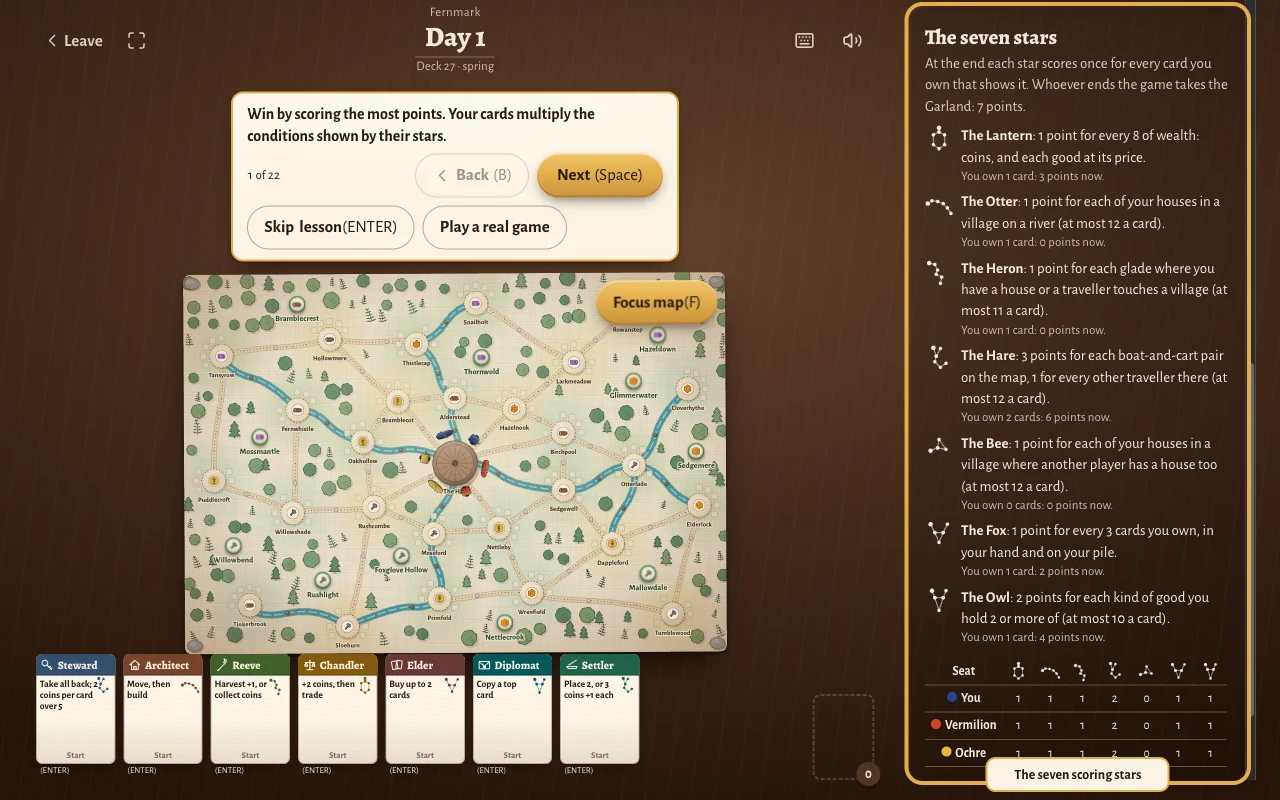
Fernmark on Tavernly is free and runs in a browser, with no account. You can play with friends or against the computer, and the lesson coaches your first turn step by step. Fernmark on Tavernly has no expansions and one map. Its seven stars panel shows a live “points now” line per star.
The panel sits on the right of the table. A line such as “You own 1 card: 3 points now” lets you see what a card is worth before buying it. Your hand sits at the bottom, and each card shows its action and its star.

- Open Fernmark on Tavernly. On your first visit, the When were you born? screen asks for Month and Year. Choose them and press Continue. The game is for players aged 13 and over, and this screen asks once.
- Under Play against bots, choose Opponents from 1 to 4. Under Bots, choose Easy, Medium or Hard, then press Play now. Bots take empty seats within five seconds and are marked as bots.
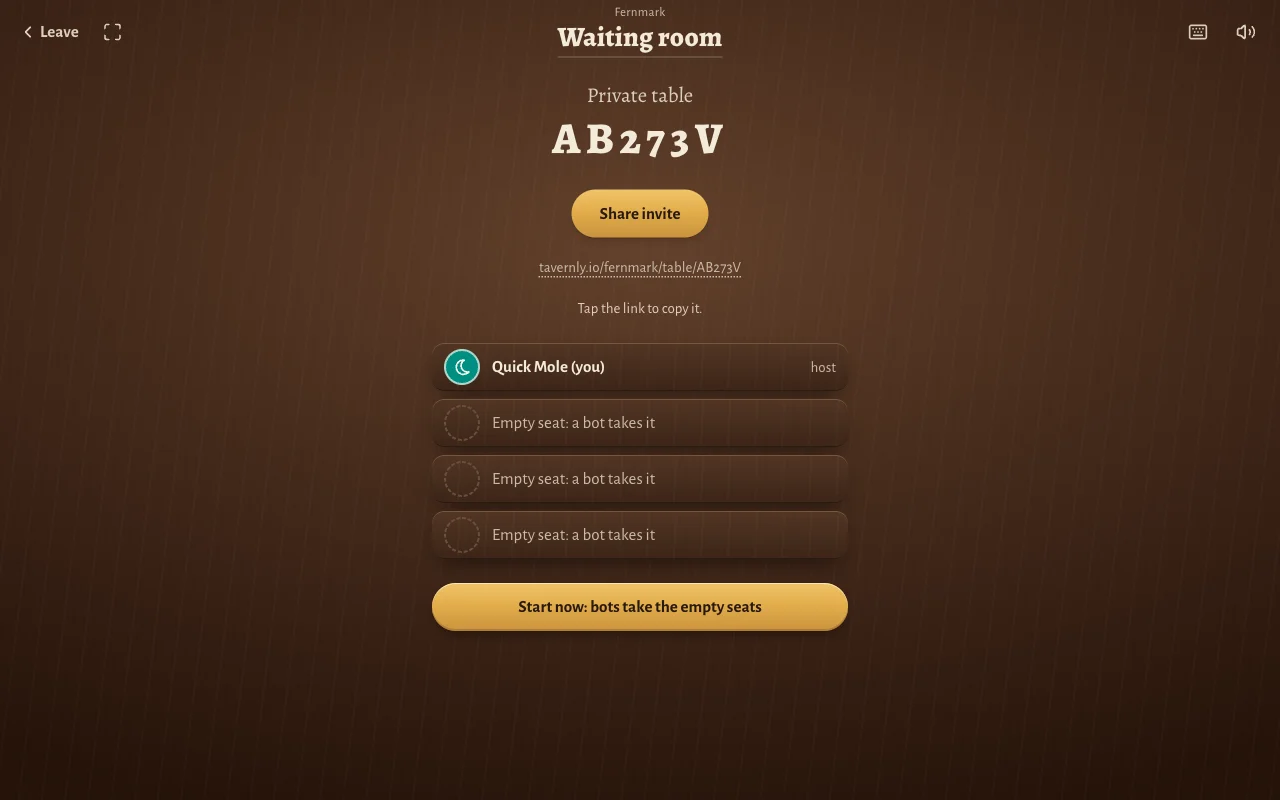
- For friends, press Play with friends. Choose Seats at the table from 2 to 5, then press Open a private table. In the waiting room, press Share invite or tap the link to copy it. Friends open that link in a browser without an account. When you are ready, press Start now: bots take the empty seats.
- To start with a coach, press Learn by playing. The lesson takes you through the opening decisions, then the same table continues with an optional tip per decision.
What "Learn by playing" teaches
The lesson in Fernmark on Tavernly has 22 steps, with a coach box above the table. It explains the goal, introduces the map, then guides you through playing a card and moving a traveller.
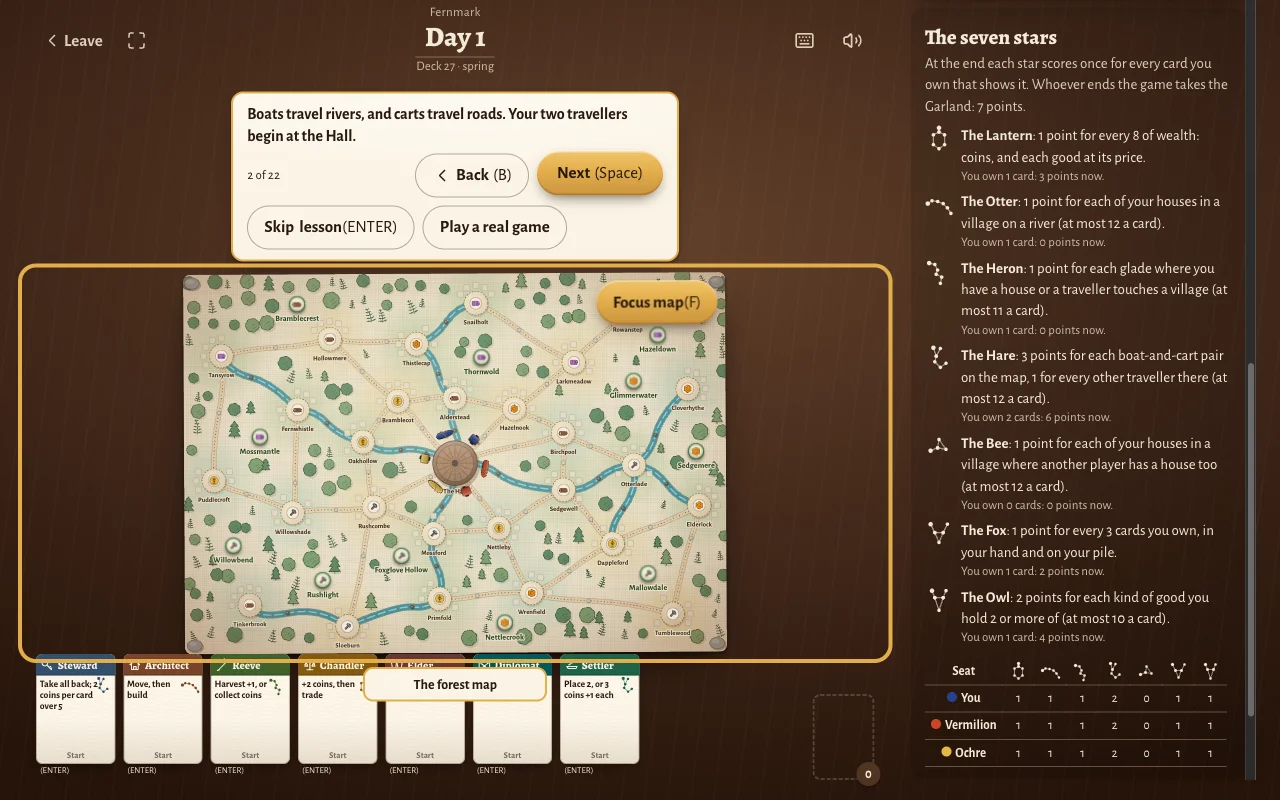
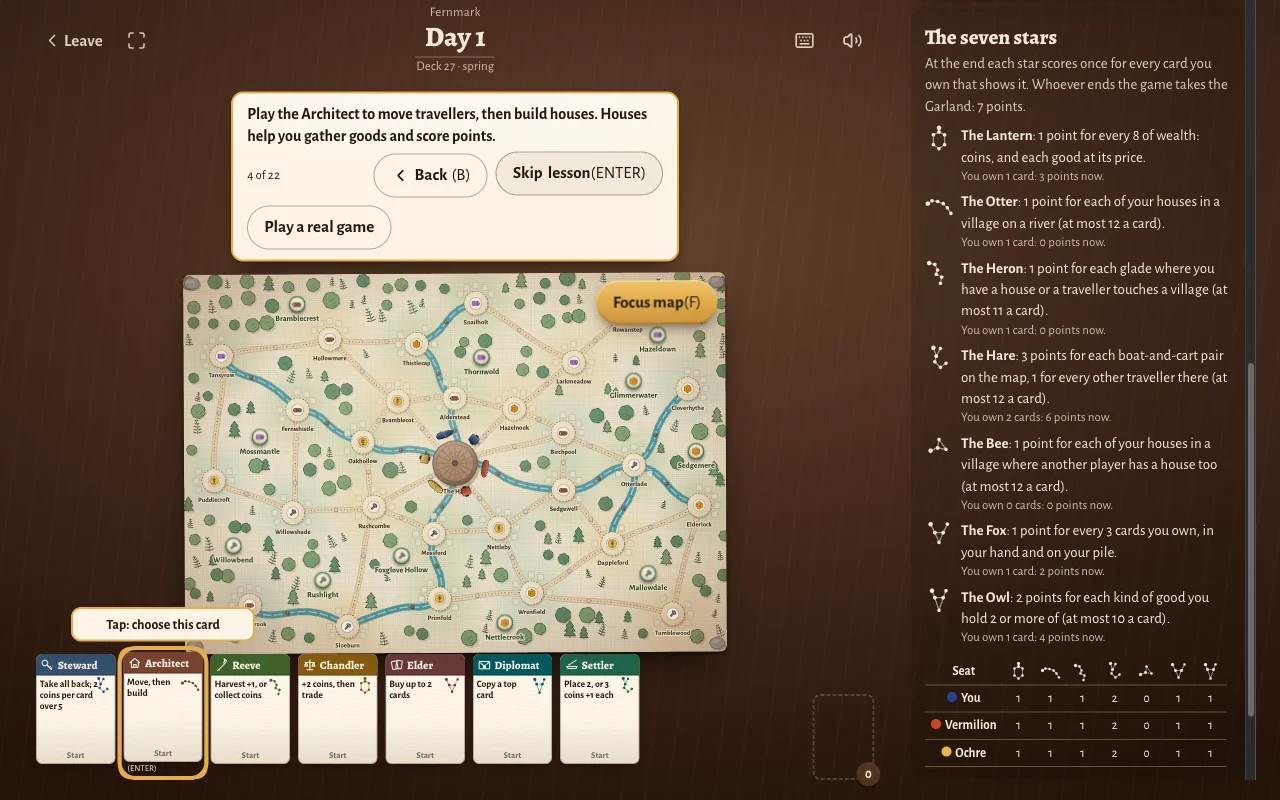
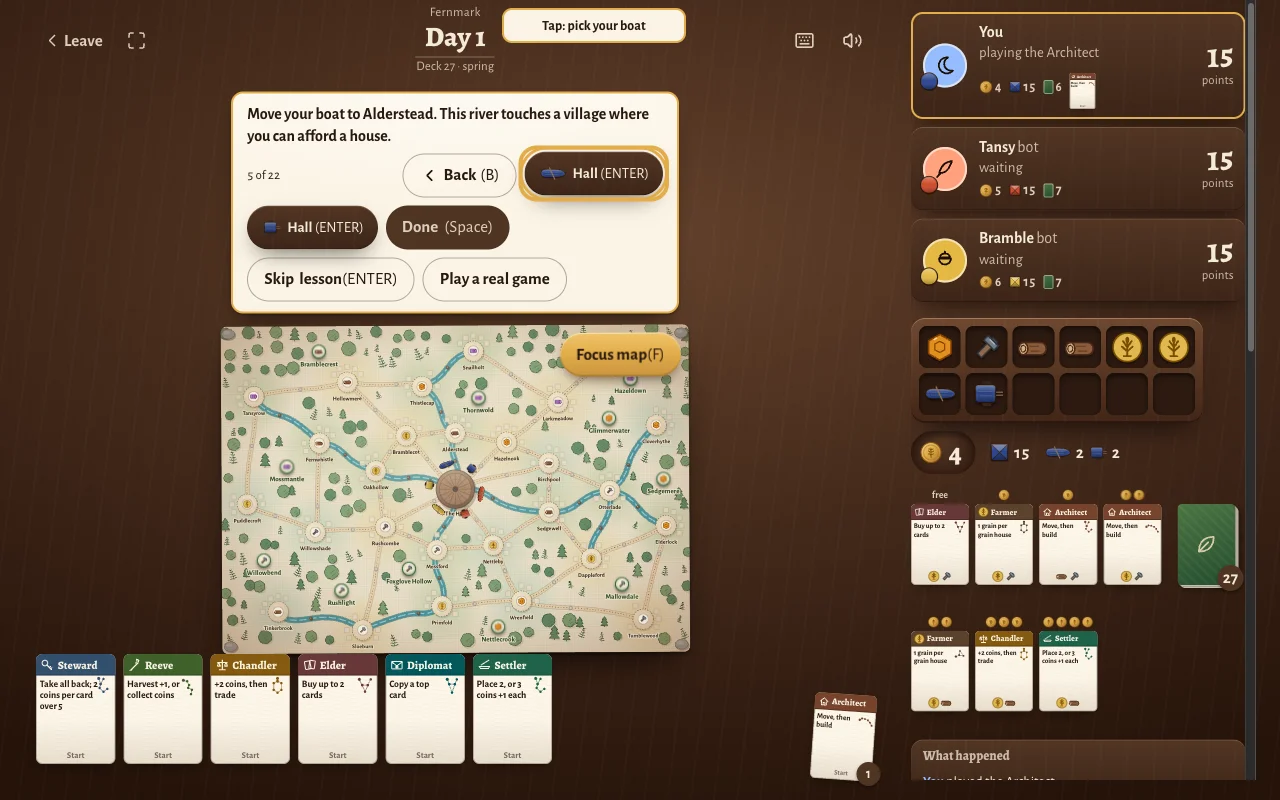
Later steps cover harvesting with the Reeve, trading with the Chandler, buying with the Elder, recovering cards with the Steward and the ending. Use Back (B) and Next (Space) to move through the lesson, or Skip lesson (ENTER) to leave it.
Fernmark on Tavernly takes about 60 minutes. Each turn has a 75-second timer. If it expires, the table plays a safe card for you and spends nothing.
These plain words help explain the names used in Fernmark on Tavernly:
| Plain words | Names in Fernmark on Tavernly |
|---|---|
| worker, a piece you move | traveller, a boat or a cart |
| city | village |
| region | glade |
| capital or start place | the Hall at the Heart |
| scoring condition | star |
| end bonus | the Garland |
| action cards | the Steward, Architect, Reeve, Chandler, Elder, Scribe, Diplomat and Settler |
The rules in two minutes
This recap describes Fernmark on Tavernly, our version. You choose an action card, move travellers, build houses and gather goods. Cards also carry stars that score at the end. Boats travel along rivers; carts take roads. On your turn, play one card from your hand onto your pile and carry out its action.
Setup. Everyone starts with the same 7 cards: Steward, Architect, Reeve, Chandler, Elder, Diplomat and Settler. Your boat and cart begin at the Hall at the Heart. The map has 27 villages in 11 glades.
On your turn:
- Play a card. Take one from your hand and place it face up on your own pile. Every card in your hand is available to play.
- Do its action. You may use less than the card allows. Tap Done when you have finished.
- Refill the market. At the end of the turn, the market cards slide down and the deck fills the top spaces. There are 7 market slots.
What the cards do:
- Steward: recover your whole pile into your hand. Receive 2 coins for each card above 5 in that pile.
- Architect: your movement allowance is one step for each traveller you have on the map. Move travellers, then build houses beside them.
- Reeve: harvest a glade. Each house there makes its good, and you receive one extra good. You can instead collect coins from harvested tokens.
- Chandler: receive 2 coins, then trade up to two kinds of goods with the bank. Prices are grain 3, timber 4, tools 5, honey 6 and silk 7.
- Elder: buy up to two market cards, paying goods and the coin charge for their slots.
- Scribe: buy one market card with goods only.
- Diplomat: use the top card of another player’s pile.
- Settler: place up to two new travellers, or receive 3 coins plus 1 for each traveller you have on the map.
Boats can use only rivers, and carts can use only roads. Each path holds one traveller. Houses cost goods and coins, and you may have one house in each village. You have 15 houses available. Your storehouse holds 12 items.
The end and the Garland. The ending begins when an empty deck prevents the market from being refilled, or a player builds their 15th house. That player receives the Garland, worth 7 points. Every other player gets exactly one more turn.
Scoring in our version. Our seven stars are our own. Each card bears a star, and that star’s condition scores for every matching card you own, counting your hand and pile. Examples include:
- The Lantern: 1 point per 8 of wealth.
- The Otter: 1 point per house in a river village, up to 12 points per card.
- The Fox: 1 point per 3 cards you own.
The highest total wins. Equal totals share the place. Rules differ between versions, and the rulebook of the version you own decides.
Tips for playing online
In Fernmark on Tavernly, the seven stars panel shows what each star is worth now. The Steward recovers played cards, houses produce goods when their glade is harvested, and market slots can add a coin charge when you buy with the Elder. These tips use the rules of our version.
- Read the stars panel before you buy. Its live “points now” lines show what a star is currently worth. Buying a card adds both an action and a scoring star.
- Play the Steward when your pile is big. Recover the whole pile into your hand, collecting 2 coins for each card above 5.
- Houses make goods when their glade is harvested. The Reeve harvests one glade; each house there produces its good, and you take one extra good.
- Mind the 12 slots. Fernmark’s storehouse holds 12 items.
- Use the Scribe for dear market slots. Slot 7 costs 4 coins extra with the Elder. The Scribe can buy from any slot and pays only goods, with no coin charge.
Questions people ask
Concordia is available through Board Game Arena and Concordia: Digital Edition. Fernmark on Tavernly offers a free browser alternative with friends, bots and a lesson. The answers below cover accounts, downloads, solo play, phones and player counts.
Can I play Concordia online for free?
Yes, you can join Board Game Arena with a free account, though hosting Concordia may need Premium. Check its FAQ while signed in. Fernmark on Tavernly is free and needs no account, including games with friends and bots. Concordia: Digital Edition is paid, and its store prices vary by region and sale.
Do I need to download anything?
Board Game Arena runs Concordia in your browser without a download. Fernmark on Tavernly also runs in a browser, so you can open it and play without installing an app. Concordia: Digital Edition needs installation from Steam, the App Store or Google Play.
Can I play Concordia with friends online?
Board Game Arena offers online Concordia tables, with free accounts and possible Premium requirements for hosting. Concordia: Digital Edition lists online cross-platform multiplayer. For Fernmark on Tavernly, press Play with friends, choose 2 to 5 seats and open a private table. Share the invite link with friends, who join in a browser without accounts. Bots fill any seats left empty when you start.
Can I play Concordia alone?
Concordia: Digital Edition offers single-player play, and its App Store listing says you can play against the AI. Fernmark on Tavernly lets you choose bots at Easy, Medium or Hard level. Pick the number of opponents and press Play now. Empty seats are filled by bots, so you can start without gathering other people.
Can I play Concordia on my phone?
Concordia: Digital Edition has App Store and Google Play versions. The App Store version needs iOS 15.0 or later. Fernmark on Tavernly runs in a phone browser; its game page says the map grows around the traveller you select. We have not tested a phone browser or the mobile apps for this guide.
How many people can play?
Board Game Arena lists Concordia for 2 to 5 players. The Concordia: Digital Edition app listings say 2 to 6. Fernmark on Tavernly supports 2 to 5 players, with a choice of seats for private tables. These ranges come from different listings, so use the range given by the option you choose.
What does Fernmark on Tavernly not have?
Fernmark on Tavernly has no expansions and one map. It does offer private tables, bots at Easy, Medium and Hard levels, and Learn by playing. If you want the official game with expansions, Concordia: Digital Edition lists paid expansions. A Fernmark on Tavernly table also closes if its server restarts.
Sources
The check date for these facts is 4 October 2026. The links below identify the listings, the dated review and our own game. We did not test the live online service of the other options or the mobile apps. Check the relevant store or account page before you pay.
- Mac Gerdts biography: designer, release year and award nomination.
- Board Game Arena, Concordia: browser play, player count, duration, tutorial and table modes.
- Board Game Arena FAQ: Premium table rules, to check while signed in.
- Steam, Concordia: Digital Edition: release date, prices, platforms, modes and paid expansions.
- App Store, Concordia: Digital Edition: price, device requirements, version, player count and in-app purchases.
- Google Play, Concordia: Digital Edition: Android availability.
- Concordia Digital Review, 11 May 2022: the dated opinion about online play and public lobby games.
- Fernmark on Tavernly: our rules, play options, lesson and table features.
Fernmark is not affiliated with or endorsed by the owner of Concordia. Concordia is a trademark of its owner. As an Amazon Associate we earn from qualifying purchases. If you want the physical game, here is Concordia on Amazon.