How to Play Carcassonne Online
By the Tavernly team ·
Carcassonne is a tile-laying game by Klaus-Jürgen Wrede that won the Spiel des Jahres award in 2001. You can play it online in three ways. One is a free site that needs an account, one is a paid official app, and one is our own free browser game with no sign-up. This page shows what each way gives you and how to start a game in each, then it gives a short recap of the rules. We make one of the three, Tilbrook on Tavernly, and we say so where it matters.
The short answer (checked 1 October 2026)
- Free, with friends, no account: Tilbrook on Tavernly. You send a link.
- With the expansions: Board Game Arena. Everyone needs an account, and hosting may need Premium.
- The official game, on Windows or a phone: Carcassonne: Tiles & Tactics. It is paid: the Steam list price is $9.99.
Which way is right for you?
We checked these pages on 1 October 2026. Prices and features change, so check the page before you pay.
| You want to… | Best choice |
|---|---|
| Play with friends, with the expansions | Board Game Arena (everyone needs an account; hosting may need a paid Premium one) |
| Play with friends, free, with no account | Tilbrook on Tavernly (send a link) |
| Play alone against the computer | The official app or Tilbrook on Tavernly |
| Have the official game and its expansions on your own device | Carcassonne: Tiles & Tactics (paid; Windows on Steam, also on phones) |
| Learn the game while you play | Tilbrook on Tavernly ("Learn by playing") or the rules recap below |
| Play on a phone | Tilbrook on Tavernly in the browser, or the official app |
Board Game Arena: Carcassonne in your browser (free to join)
Board Game Arena (BGA) is a site for online board games. Its Carcassonne game is listed as free to play, for 2 to 5 players, with about 15 minutes per game. The site marks Carcassonne as a Premium game, so opening a table may need a paid Premium membership, while a free account may only join tables. Check this on the site before you plan a game with friends. It has four expansions: The River, Inns & Cathedrals, Traders & Builders and The Princess & the Dragon.
- Create a free account on the site and sign in.
- Open the Carcassonne page.
- Start a game: join a table of other players, or make your own table.
- To play with friends, make a table and invite them. Each friend needs an account too. If you have no Premium membership, ask a friend who has one to host.
- Choose the expansions you want before the game starts.
Carcassonne: Tiles & Tactics, the official app (paid)
Carcassonne: Tiles & Tactics is the official digital version. The Steam list price is $9.99, and we saw it at $2.99 in a 70% sale on 1 October 2026. The Steam version runs on Windows only. The base game has one free expansion, The Abbot, and four paid ones.
- Buy it on Steam (Windows only), or get the mobile version from the App Store or Google Play.
- Pick a mode: solo against computer opponents, pass and play on one device, or online.
- For online play, join a public match, play a ranked game, or make a private match for friends.
- Phones and tablets can join a Steam game through Steam Remote Play.
Tilbrook on Tavernly: a free alternative with no sign-up
A Carcassonne alternative that runs in your browser is Tilbrook on Tavernly. It is a tile-laying game for 2 to 5 players about a green valley. It has its own art, tiles and names, and it has no expansions. If you want expansions, use Board Game Arena or the official app.

- Open Tilbrook on Tavernly and press Play now. Tilbrook on Tavernly asks for your birth date once, because it is for players aged 13 and over.
- Bots fill the empty seats, so a game starts at once. Pick a bot level first: easy, medium or hard.
- To learn first, press Learn by playing. It teaches one full turn in about a minute (see the pictures below).
- To play with friends, press Play with friends. Pick the number of seats, from 2 to 5, and press Open a private table. Press Share invite and send the link. Your friends join in the browser, and nobody needs an account. Press Start now when they are in, and bots take any empty seat.
- A game takes about 35 minutes. Each turn has a 60-second timer. If a player is away, the game places the tile for them and goes on.
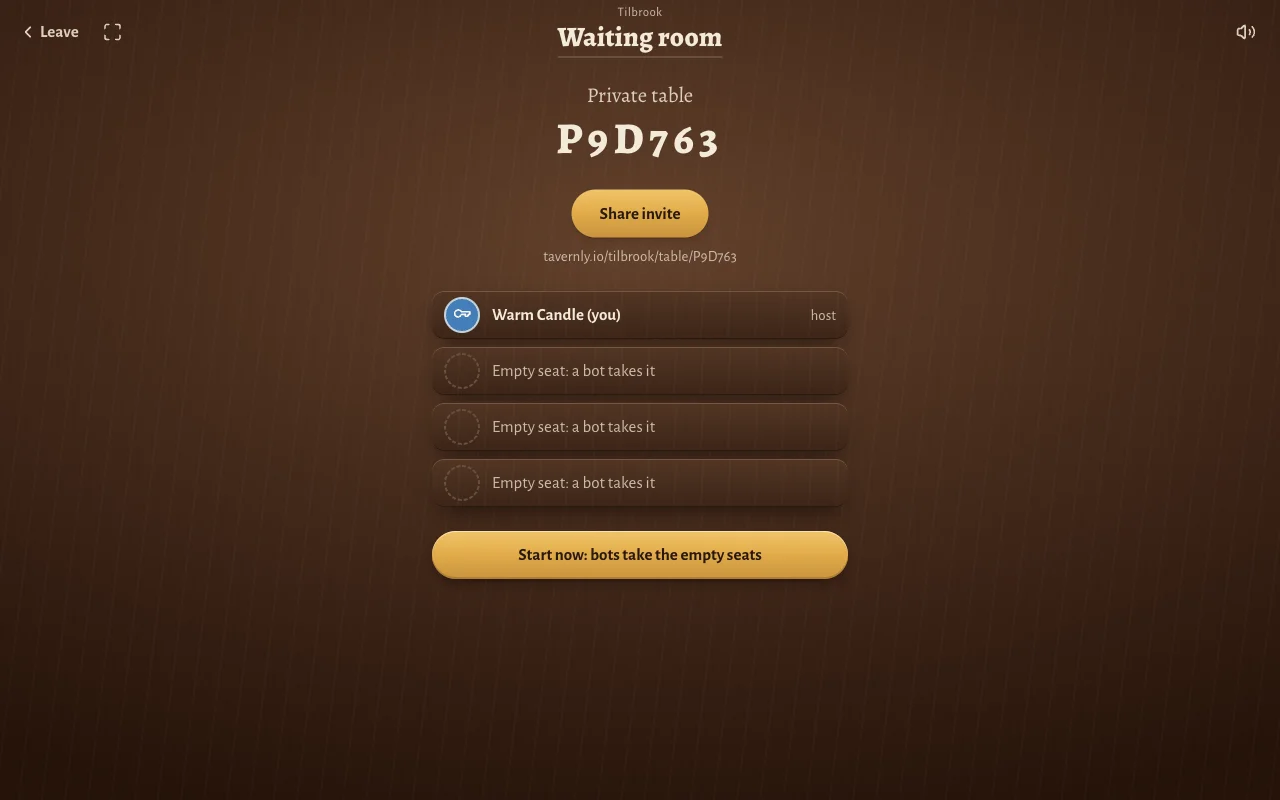
What "Learn by playing" teaches
The lesson is one full turn, with a coach that tells you what to do at each step.
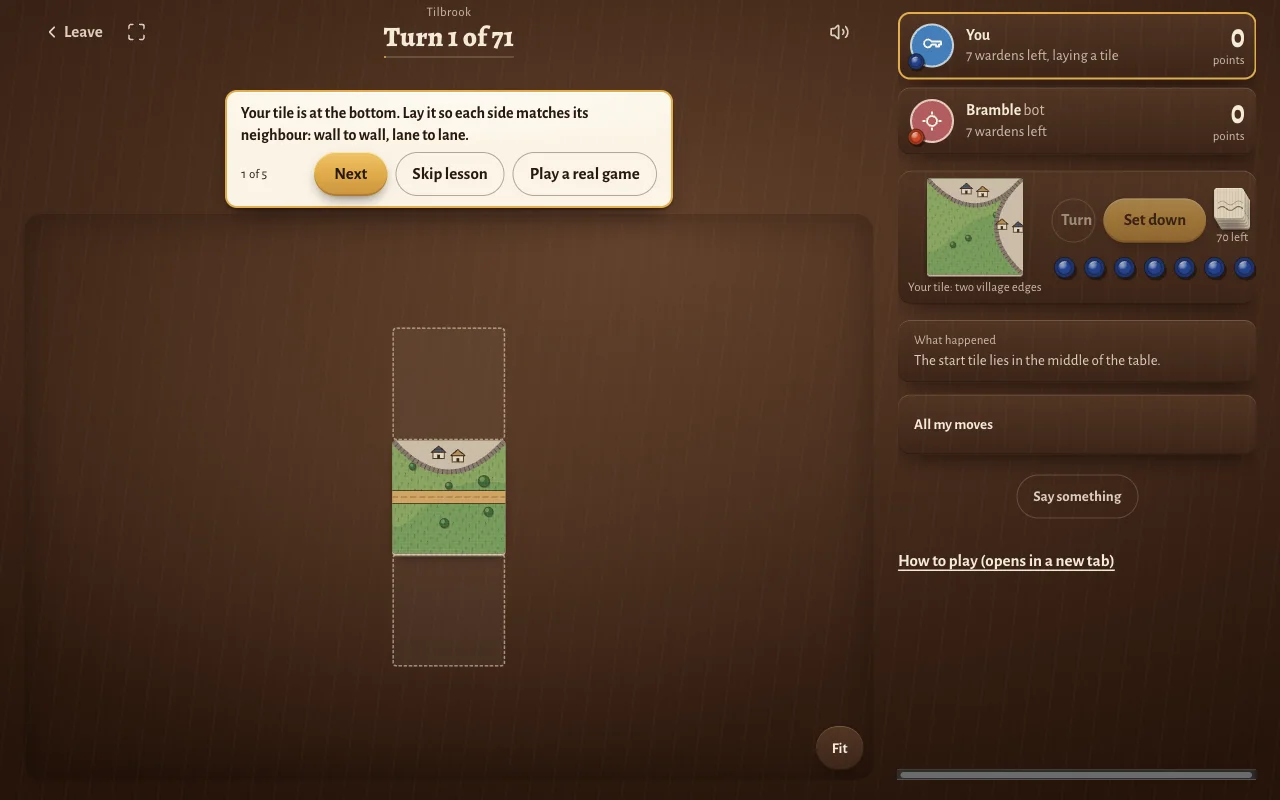
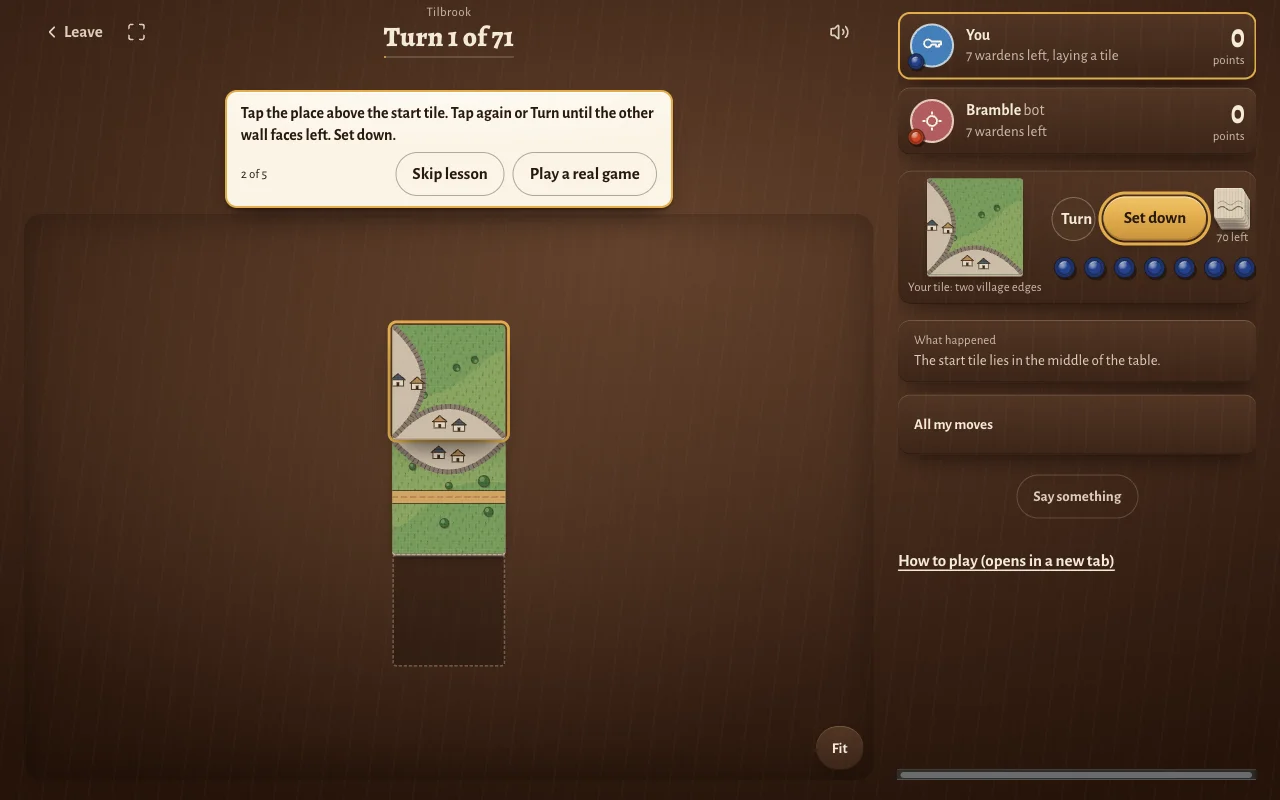
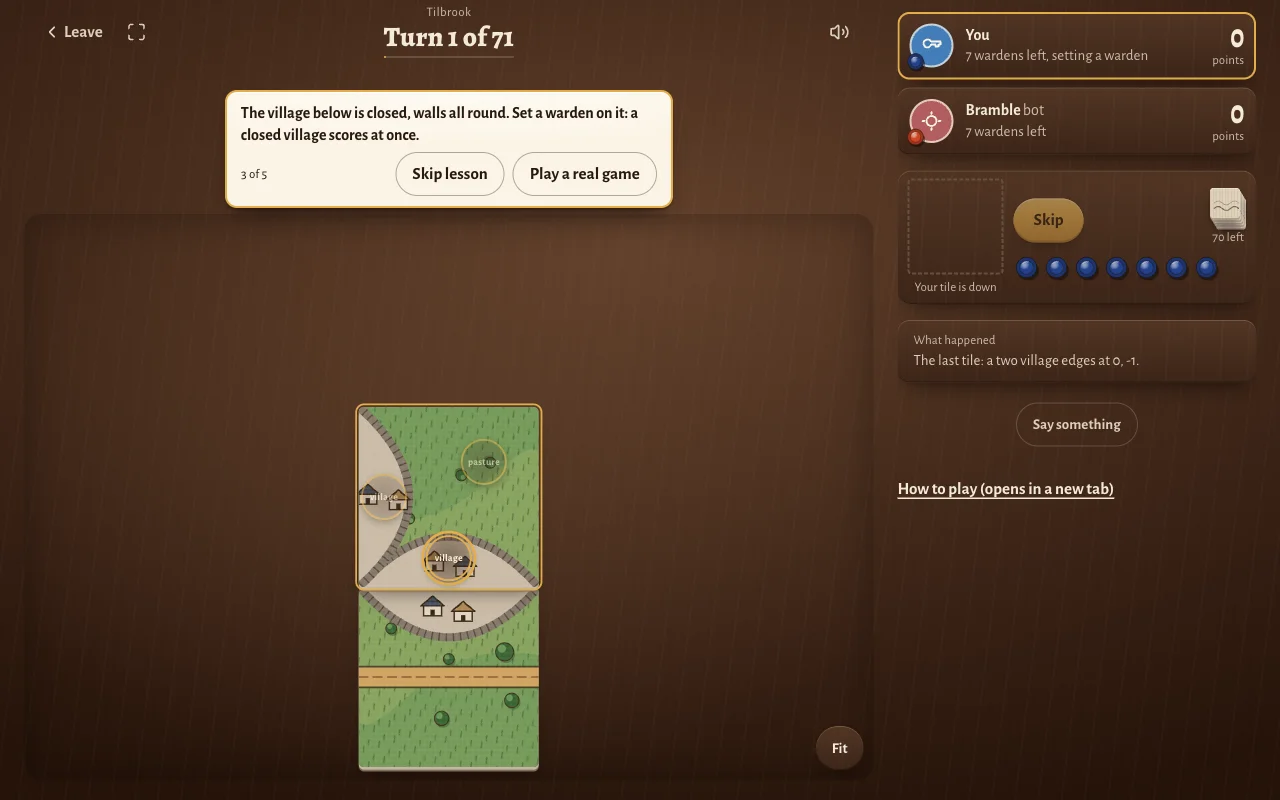
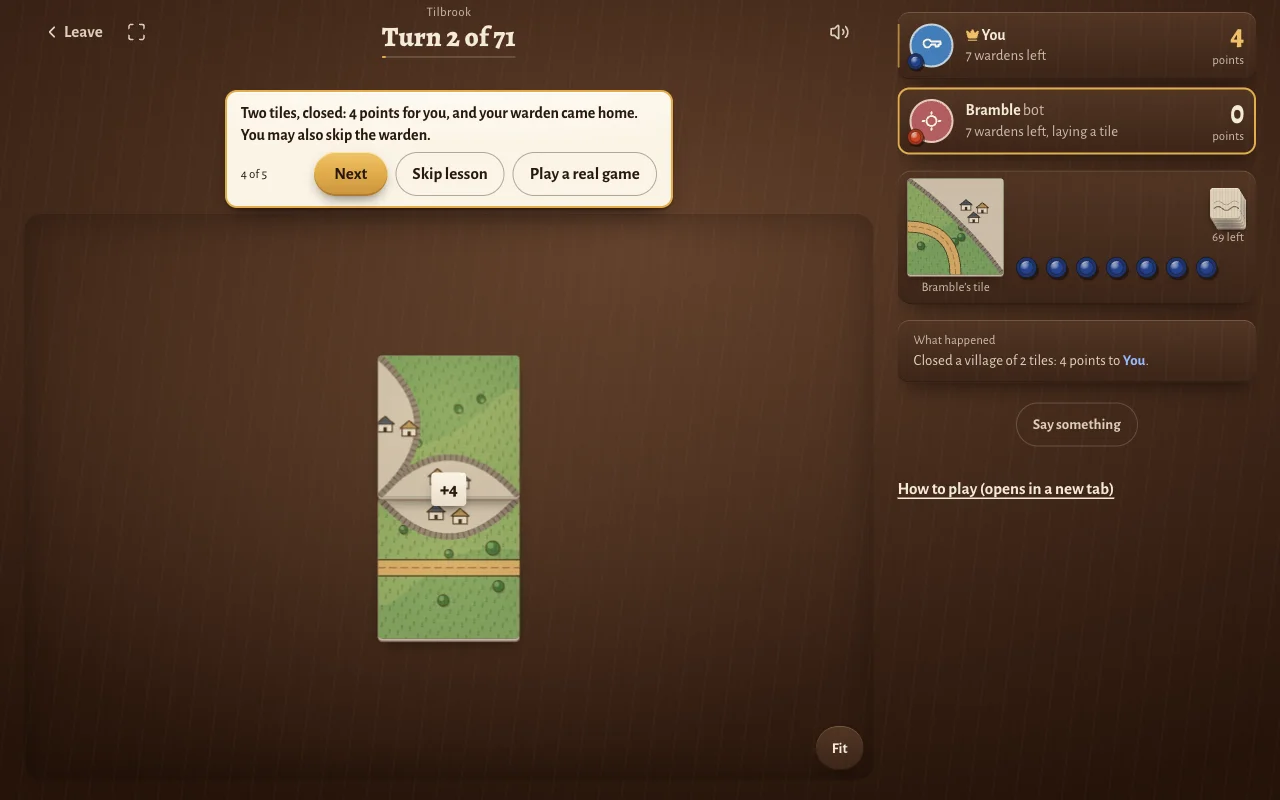
The words in the game are different from the ones in the rules recap below:
| Plain words | Tilbrook's names |
|---|---|
| road | lane |
| city | village |
| monastery | mill |
| field | pasture |
| follower | warden |
The rules in two minutes
Read this once before your first online game. You build one map together, one tile at a time. The map has four kinds of feature: roads, cities, monasteries and fields. You score points when a feature is complete, and you use followers to claim features.
Setup. One start tile lies face up in the middle. The other 71 tiles are shuffled face down. Each player has 7 followers.
On your turn:
- Draw the top tile. Everyone can see it.
- Place it next to a tile that is already on the table, turned any way you like. Every side that touches another tile must match: road to road, city to city, field to field. If the tile fits nowhere, set it aside and draw again.
- Place a follower (optional). You may put one follower on the tile you just placed: on a road, a city, a monastery or a field. You may do this only if that feature has no follower of any player yet. A feature can be big, so look at the whole feature across the map, not only at your tile.
- Score every feature that your tile completed. Followers on a completed road, city or monastery go back to their owners. Followers on fields stay until the end.
Points for a completed feature:
| Feature | Complete when | Points |
|---|---|---|
| Road | Both ends are closed | 1 per tile |
| City | The wall is closed all round | 2 per tile, plus 2 per banner |
| Monastery | All 8 tiles around it are placed | 9 |
The player with the most followers on a feature takes all its points. If players tie for most, each of them takes all the points.
The end. The game ends after the last tile. Then you score what is left:
- An unfinished road scores 1 per tile.
- An unfinished city scores 1 per tile and 1 per banner.
- An unfinished monastery scores 1, plus 1 for each tile around it.
- Fields: each completed city next to a field scores 3 points for the player with the most followers on that field.
The most points wins. Rules differ a little between editions and expansions. For the edition you own, the rulebook in the box decides.
Tips for playing online
- Keep two followers in hand. If you place all seven early, you cannot claim the big feature that comes later.
- Do not claim fields early. A field follower stays on the map until the end. Use fields in the last third of the game, next to cities that are nearly done.
- Finish small features. A short road or a small city pays at once and returns your follower.
- Watch the shared features. When you join two features that each hold a follower, those followers now share one feature. The player with more followers there takes the points.
- Agree on the rules before you start. With friends, say which expansions you use. On Board Game Arena you choose them when you make the table.
Questions people ask
Can I play Carcassonne online for free?
Yes, in two ways. Board Game Arena lists Carcassonne as free to play, and a free account may join tables, but opening a table may need a paid Premium membership. Tilbrook on Tavernly is a free Carcassonne alternative that needs no account at all. The official app, Carcassonne: Tiles & Tactics, is paid: the Steam list price is $9.99.
Do I need to download anything?
No, for two of the three ways. Board Game Arena and Tilbrook on Tavernly run in a web browser, so you install nothing. Carcassonne: Tiles & Tactics is an app, so you install it from Steam on Windows, or from the App Store or Google Play on a phone.
Can I play Carcassonne with friends online?
Yes, in all three ways. On Board Game Arena, every player needs an account, and the host may need Premium. In Carcassonne: Tiles & Tactics, you make a private match for your friends. On Tavernly, you open a private table for Tilbrook, press Share invite and send the link. Your friends join in the browser with no account.
Can I play Carcassonne alone?
Yes. Carcassonne: Tiles & Tactics has a solo mode against computer opponents, and it also has pass and play for one device. Tilbrook on Tavernly fills every empty seat with a bot at easy, medium or hard level, so a game starts at once, with no waiting for other players.
How many people can play?
Carcassonne is played by 2 to 5 players, and Board Game Arena lists the same range. On Tavernly, Tilbrook also takes 2 to 5 players. A quick game against bots starts with 3 seats, and a private table can be set to 2, 3, 4 or 5 seats.
Can I play Carcassonne on my phone?
Yes. The official app is on the App Store and Google Play, and the Steam version, which is Windows only, can be streamed to a phone or tablet with Steam Remote Play. Tilbrook on Tavernly runs in a phone browser. We did not test online play in the mobile apps.
What if my tile fits nowhere?
Set the tile aside and draw another one. In Tilbrook on Tavernly, the game does this for you: a tile that fits nowhere is put out of the game, and you draw again. This rule can differ between editions, so check the rulebook of the edition you own.
Do I get my followers back?
Yes, when the feature you claimed is complete and scores. A finished road, city or monastery sends its followers home at once. Followers on fields do not return until the end of the game, so you cannot reuse them. This is why it is wise to keep two followers in hand.
Sources
We checked these pages on 1 October 2026:
- Board Game Arena, Carcassonne: price, players, play time, expansions, and the designer and award.
- Steam, Carcassonne: Tiles & Tactics: price, platform, expansions, online modes and Remote Play.
- App Store, Carcassonne - Tiles & Tactics: the mobile version.
- Tilbrook on Tavernly: the rules, seats, timer and bot levels of our own game.
Tilbrook is not affiliated with or endorsed by the owner of Carcassonne. Carcassonne is a trademark of its owner. As an Amazon Associate we earn from qualifying purchases. If you want the physical game, here is Carcassonne on Amazon.