How to Play Bomb Busters Online
By the Tavernly team ·
Bomb Busters, designed by Hisashi Hayashi and published by Pegasus Spiele and Cocktail Games, won the Spiel des Jahres 2025 award. We found no official online version of Bomb Busters on Board Game Arena, Steam or the Apple App Store (checked 11 October 2026), and Pinholm on Tavernly is our own free browser alternative. We make Pinholm on Tavernly.
The short answer (checked 11 October 2026)
- Official version: We found no official online version of Bomb Busters on Board Game Arena, Steam or the Apple App Store.
- Online alternative: Pinholm on Tavernly lets you play with friends or bot teammates.
- Learn first: Choose Learn by playing on Pinholm on Tavernly for a real game with a coach.
Which way is right for you?
Choose the physical game to play the original Bomb Busters. Choose Pinholm on Tavernly for friends, bots or a guided lesson in your browser.
| You want to | Choose |
|---|---|
| Play the original | The physical Bomb Busters game from Pegasus Spiele |
| Play online with friends, with no account | Pinholm on Tavernly |
| Play alone with bots | Pinholm on Tavernly |
| Learn first | Pinholm on Tavernly, Learn by playing |
Is there an official online version of Bomb Busters?
Our checks on 11 October 2026 found no official online version on the three pages below. Pegasus Spiele also mentions no app or online version on its product page. The only official way we found is the physical game.
- Board Game Arena game list: no game named Bomb Busters found.
- Steam store search: no game with that name returned.
- Apple App Store search, US store: no app with that name returned.
Tip: The Pegasus Spiele physical game page lists 2 to 5 players, age 10 and up, 20 to 40 minutes, and 34.99 euros including VAT, plus shipping.
Method 1: A Bomb Busters alternative: Pinholm on Tavernly
A Bomb Busters alternative is Pinholm on Tavernly. Our free browser game has its own art, pin names and sounds. You can play with bot teammates, invite friends to a private table, or learn with a coach. You share one team result.
You need: A browser; no account; players aged 13 and over. On the birth date screen, When were you born?, choose Month and Year, then Continue.
Play against bots
- Open the game page. Visit Pinholm on Tavernly.

- Pick your teammates. Under Teammates, choose 1 to 4. The card shows the table size, such as "Join a table of 4."
- Choose the bot level. Under Bot teammates, pick Easy, Medium or Hard.
- Press Play now. Bots join within five seconds.
Play with friends
- Press Play with friends. This opens the private-table setup.
- Pick the vault. Use Vault to select from 1 to 8.
- Pick the seats. Under Seats at the table, choose 2 to 5.
- Press Start a private table. You enter the waiting room.
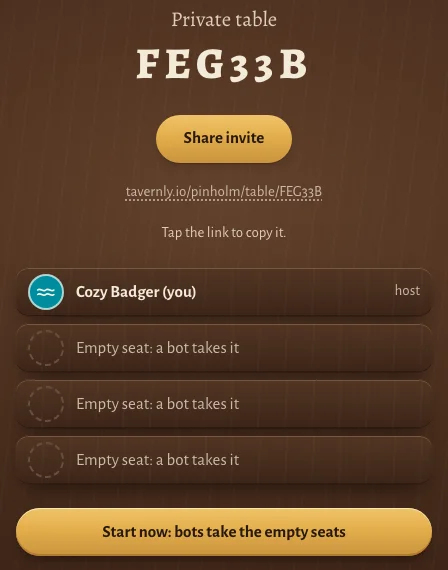
- Share the invite. Press Share invite to invite your friends.
- Start the table. Press Start now: bots take the empty seats when your friends have joined.
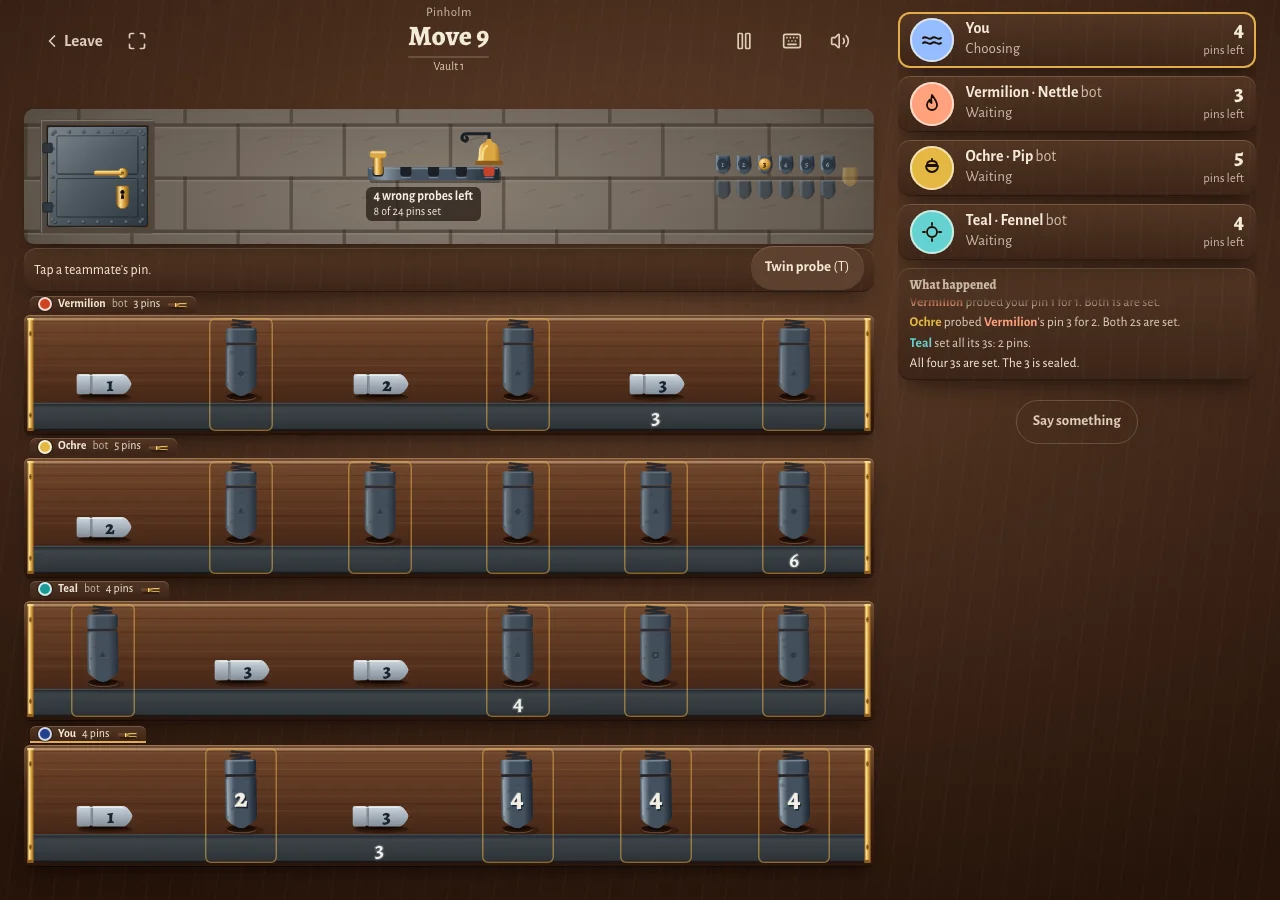
- Take your first turn. The table looks like the picture below.
Try the guided lesson
- Open the lesson. Press Learn by playing to open Your first vault, with you and two bots.
- Chalk your 3. Tap your 3, then tap Chalk.
- Probe a 5. Tap their 5, tap your 5, then tap Probe.
- Set all the 1s. After your teammates' turns, count the 1s, then tap Set all 1s.
Learn the rules of Pinholm on Tavernly
In Pinholm on Tavernly, your team sets every pin to open the vault. You find matching numbers with probes and public chalk marks, and you keep the bell from ringing.
| Plain word | Our name |
|---|---|
| A numbered piece you hold | pin |
| Your row of hidden pieces | rack |
| The mistake counter | the bell |
| A public hint about a number | chalk mark |
| Naming a number at a teammate's piece | probe |
| Doing a whole number yourself | set all |
| One-use helpers | tools |
| A level | vault |
Read your rack. Only you can read it; numbers run lowest to highest from the left. Iron pins use 1 to 12, four of each; probe for brass as one group called "brass".
Chalk a pin. Before the first turn, each player chalks one of their own iron pins. Everybody sees its number.
Probe. You take exactly one action each turn. There is no pass.
Tap a teammate's standing pin, then your own standing iron pin to name its number; press Probe. Right: both matching pins lie face up. Wrong: the bell advances one step, and a chalk mark shows their pin's real number.
Set all. Set every standing pin of a number if you hold them all. If only trap pins remain standing in your rack, show them.
Use the twin probe. Once per vault, each player may target two pins in one teammate's rack and name one iron number. A trap pin never rings the bell during this action. Press Twin probe (T).
Watch the bell. It has as many steps as seats. A wrong probe reaching the last step rings it; the team loses. An ordinary probe at a trap pin rings it immediately.
Open the vault. Set every pin to win together. From vault 3, tools become available after two iron pins of their number are set. Each works once.
How a vault ends
| What happens | Result |
|---|---|
| Every pin is set | Vault opens; team wins |
| The bell rings | The team loses |
Our version: Pinholm on Tavernly has 8 vaults, all open from the start, without a campaign. Vault 1: 24 pins, numbers 1 to 6, no brass, traps or tools. Vault 2: 32 iron, 2 brass. Vault 3: 40 iron, 1 trap, tools. Vault 4: 48 iron, 2 brass, 1 trap, tools. Vaults 5 to 8 vary brass and traps; some hide which are in play.
Tips and warnings
Chalk marks show numbers to everyone. Set all needs no guess when you hold every standing pin of a number.
- Make the first chalk mark useful. Chalk an iron pin you know the team can use.
- Probe a known match. Probe a chalked pin when you hold the same number.
- Set all when the count is sure. In the lesson, two 1s are set, so you can safely set your last two.
- Read the move record. Check What happened after each bot move to see what changed.
- Use preset phrases. Open Say something for preset chat; no phrase names a number or pin.
Warning: One human with bots has no timer; other tables give each decision 60 seconds, and when time runs out the server plays a safe move for you.
Questions people ask
Is there an official online version of Bomb Busters?
We found no official online version of Bomb Busters on Board Game Arena, Steam or the Apple App Store (checked 11 October 2026). The Pegasus Spiele page describes the physical original. Pinholm on Tavernly is our own alternative.
Can I play Bomb Busters online for free?
Pinholm on Tavernly is free and needs no account. For bot play, choose your teammates and their level, then press Play now. For friends, open a private table and send the link from Share invite.
Do I need to download anything?
Pinholm on Tavernly runs in your browser, so you need no download. Open its page and choose how to begin. Before your first game, enter your month and year on the birth date screen; Tavernly is for players aged 13 and over.
Can I play alone against the computer?
Yes. In Pinholm on Tavernly, press Play with friends, open a private table and press Start now: bots take the empty seats. Bots fill every seat. With one human and the rest bots, there is no timer. You share one team result, with no personal score.
Can I play with friends?
Yes. In Pinholm on Tavernly, press Play with friends, select the vault and seats, and create a private table. Use Share invite to send its link. Friends open it in their browsers. When you start, bots take any seats that remain empty.
Can I play on my phone?
Pinholm on Tavernly runs in a browser, but we did not test it on a phone. The pictures show our pages and controls as we saw them.
How many players?
The Pegasus Spiele page lists Bomb Busters for 2 to 5 players. Pinholm on Tavernly also supports 2 to 5 players, all on one team. The private-table setup lets you pick 2 to 5 seats, and bots fill empty ones. Everyone wins or loses together.
Sources
- Spiel des Jahres jury: designer, publishers, cooperative game and Spiel des Jahres 2025 award.
- Pegasus Spiele: players, age, play time, physical price, and no mention of an app or online version.
- Board Game Arena: game-list check.
- Steam: store-search result.
- Apple App Store: US app-search result.
- Pinholm on Tavernly: our setup, guided lesson, rules, bots and timer.
We checked all outside pages on 11 October 2026. We did not check Google Play, and we did not test a phone.
Pinholm is not affiliated with or endorsed by the owner of Bomb Busters. Bomb Busters is a trademark of its owner. As an Amazon Associate we earn from qualifying purchases.
If you want the physical game, here is Bomb Busters on Amazon.