How to Play Azul Online
By the Tavernly team ·
Azul is a tile-drafting game by Michael Kiesling and the 2018 Spiel des Jahres winner. You can play Azul on Board Game Arena in the browser. On 7 October 2026 we found no official Azul app listed on Steam, the US App Store or Google Play. We make Glazewick on Tavernly, our own tile-drafting game. Try Glazewick on Tavernly for free with no account.
The short answer (checked 7 October 2026)
- Azul with the official rules: Board Game Arena, free to join, hosting may need Premium.
- Official app listings: On 7 October 2026 we found no official Azul app listed on Steam, the US App Store or Google Play.
- Free play with friends or bots, no account: Glazewick on Tavernly, our own game, with private tables and “Learn by playing”.
Which way is right for you?
For Azul with the official rules, look at Board Game Arena. For free play with friends and no account, or computer opponents, look at Glazewick on Tavernly. These choices reflect the pages and browser features we checked on 7 October 2026; the table lists them by what you want to do.
| You want to | Where to look |
|---|---|
| Play with friends with the official rules | Board Game Arena: free to join, hosting may need Premium |
| Play with friends, free, with no account | Glazewick on Tavernly: open a private table and share the invite |
| Play alone against the computer | Glazewick on Tavernly: choose computer opponents |
| Learn while you play | Board Game Arena has a tutorial; Glazewick on Tavernly has “Learn by playing” |
| Play over days | Board Game Arena: turn-based play |
| Play on a phone | Board Game Arena’s Google Play app lists Azul; Glazewick on Tavernly runs in the browser |
| Own the physical game | The Azul box, through the Amazon search linked in the footer |
Board Game Arena: Azul in your browser (free to join)
Board Game Arena hosts Azul with the official rules in your browser, with no download. It is free to join, hosting may need Premium. Its page lists 2 to 4 players, a tutorial, real-time and turn-based play, and more than 28 million Azul games played.
- Open the Azul page on Board Game Arena.
- Create a free account or sign in.
- Check the current Premium terms if you want to host. We did not check those terms while logged in.
- Join a table, or host one under those terms.
The page lists an average game time of 11 minutes. Turn-based play lets a game continue over a longer time.
Board Game Arena also has a Google Play app. Its listing summary says: “Challenge 10M opponents in Azul, Terraforming Mars, Wingspan, and 1,000+ games.”
Is there an official Azul app?
On 7 October 2026 we found no official Azul app listed on Steam, the US App Store or Google Play. For browser play, use Board Game Arena. If you want to own Azul, see the physical game link in the footer.
An Azul alternative: Glazewick on Tavernly
Glazewick on Tavernly is our free browser tile-drafting game for 2 to 4 players, with no sign-up or download. A game takes about 15 minutes. You can play with friends, take a seat against bots, or choose “Learn by playing” for a real game with a coach.

- Play now: Open Glazewick on Tavernly, choose 1, 2 or 3 opponents, and press Play now. The default is 1 opponent. Pick Easy, Medium or Hard bots; Medium is the default. Bots take empty seats within five seconds.
- Learn by playing: Press Learn by playing for a real game with a coach. The lesson “Your first round” teaches taking tiles, filling rows, placing tiles and breakage.
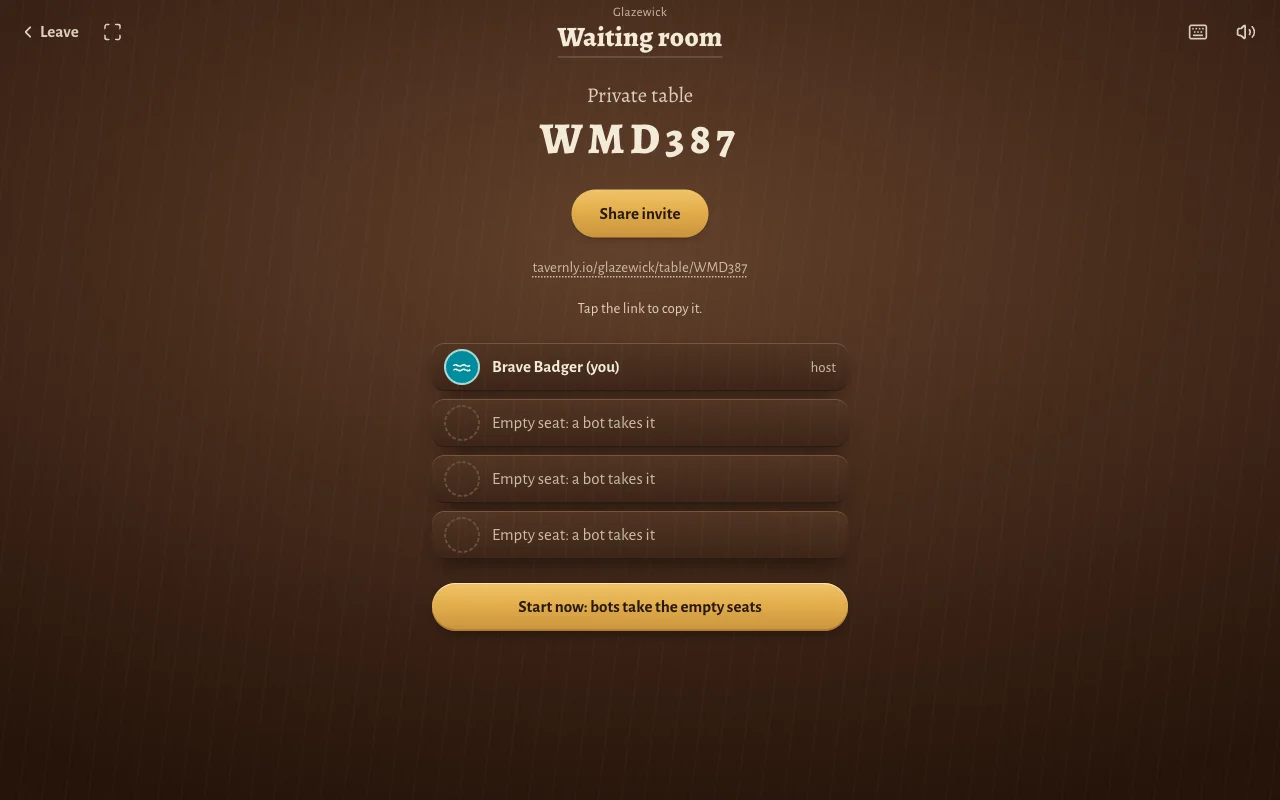
- Play with friends: Press Play with friends. Choose 2, 3 or 4 seats, with 4 as the default, then press Open a private table. Use Share invite to send the link. Friends join in the browser with no account. Press Start now: bots take the empty seats when you are ready. Every bot is marked as a bot.
Before your first game, Tavernly asks “When were you born?” It asks everyone once because the site is for players aged 13 and over. Pick a month and a year, then press Continue.
A take uses four taps: choose a kiln or the shelf, choose a colour, choose a drying row or the breakage row, then press Put down. Undo (U) takes back a choice before you put it down. Each decision has a 60-second timer. If time runs out, the table plays the safe take for you: the one that breaks the fewest pieces.
Tiles have carved signs as well as colours: Cobalt wave, Celadon leaf, Saffron sun, Oxblood diamond and Ash ring. You do not need to tell them apart by colour alone.
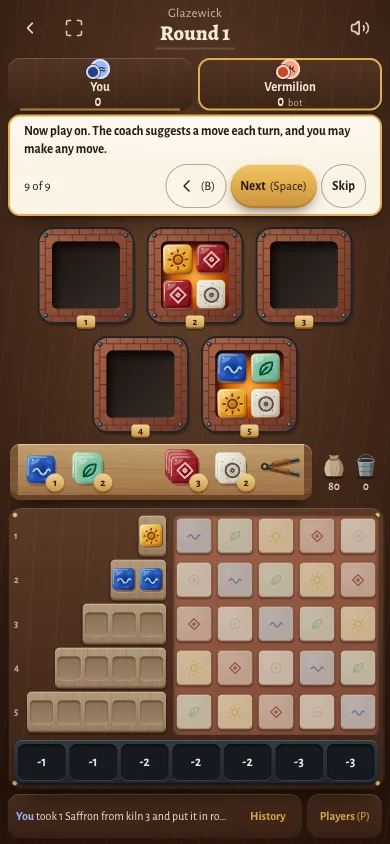
On a phone at 390 pixels wide, the whole table fits on one screen without zoom: the kilns, shelf, drying rows, panel and breakage row. History and Players (P) are at the bottom.
A secret seed decides who starts and the order of the clay bin. Its fingerprint appears when the game starts, and the seed appears when it ends, so you can check it.
Glazewick on Tavernly has its own names, art and look. It has no expansions, variants or play over days. Chat uses preset messages only. A game lives on the server, so the table closes if the server restarts.
What "Learn by playing" teaches
“Your first round” has 9 steps. Steps 2 and 5 wait for you to make the taught take, with rings around each part to tap. Use Back (B) and Next (Space) to move through the coach, or Skip lesson to leave it.
Step 1: Taking and scoring. The coach introduces the round: “Take tiles from a kiln and fill a drying row. Fired tiles go to your panel and score.”
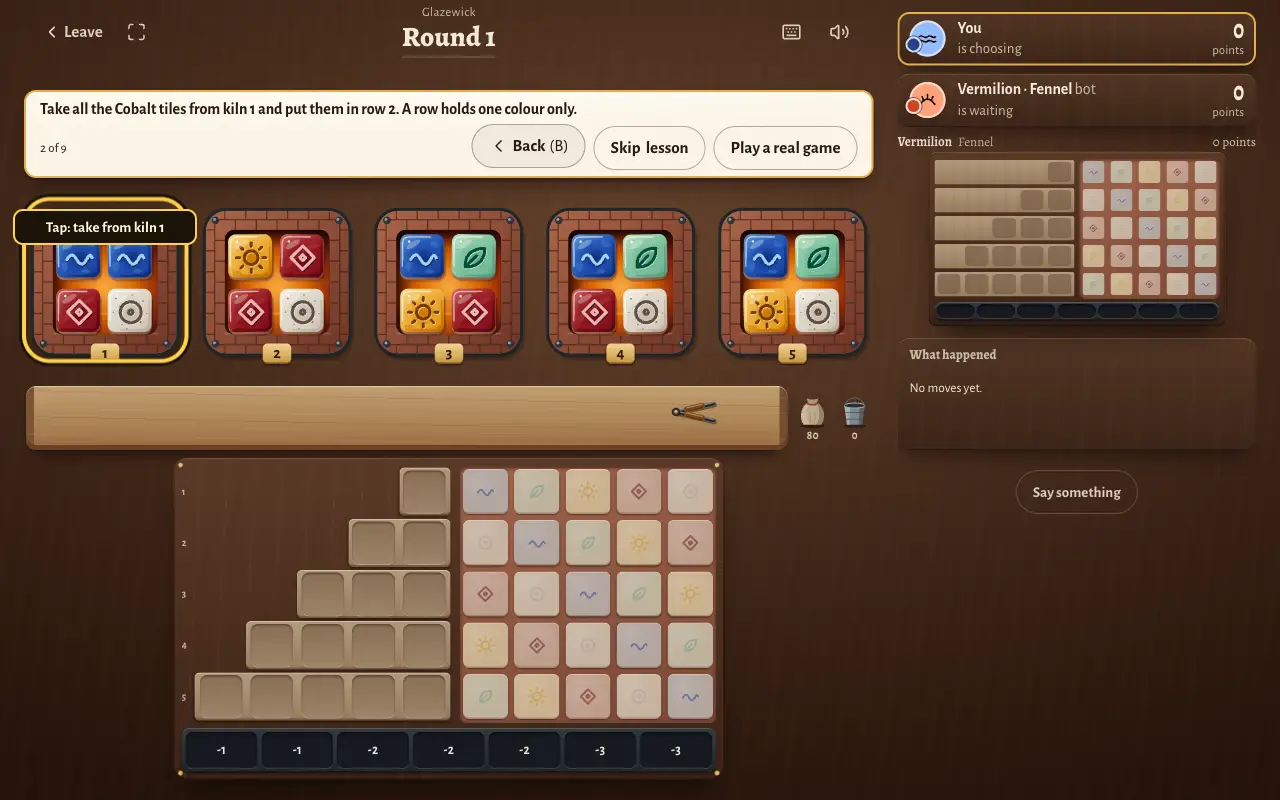
Step 2: Make your first take. “Take all the Cobalt tiles from kiln 1 and put them in row 2. A row holds one colour only.” Follow the rings and press Put down.
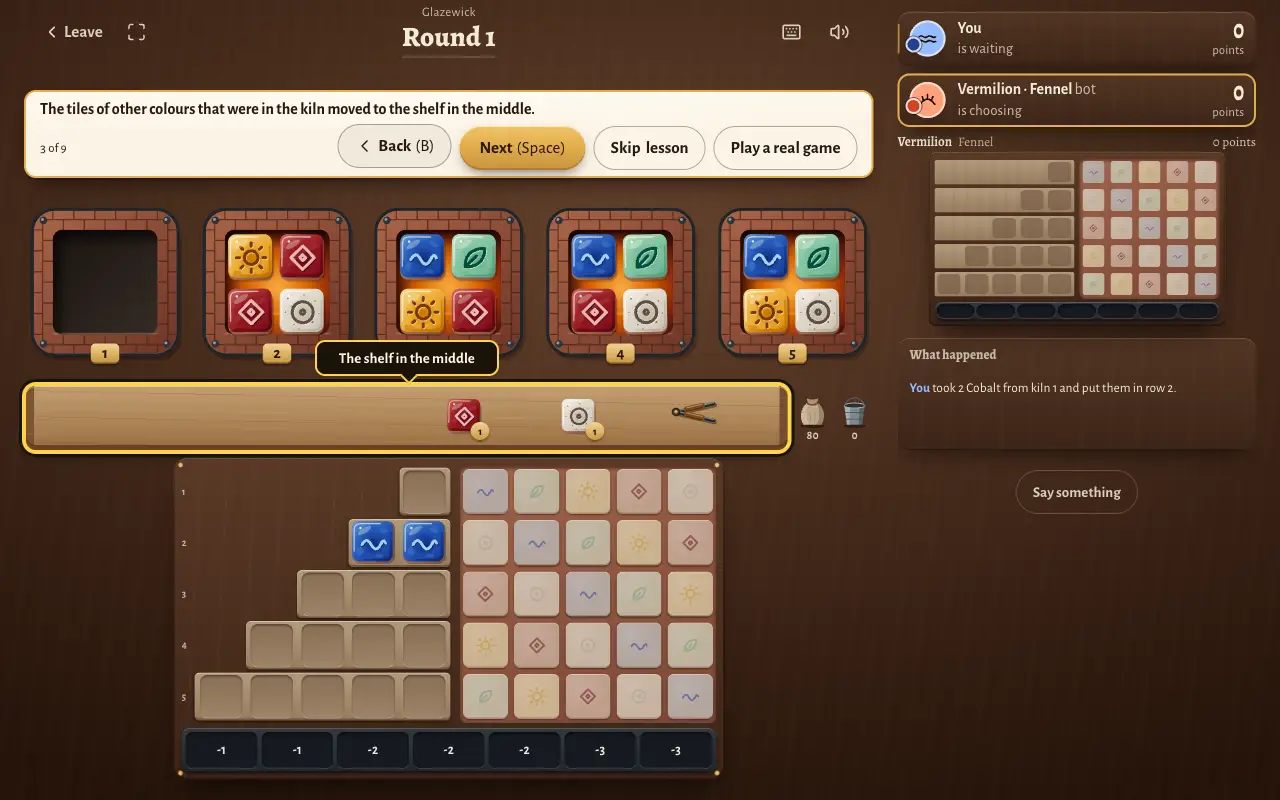
Step 3: Find the remaining tiles. “The tiles of other colours that were in the kiln moved to the shelf in the middle.”
Step 4: Check the full row. Your two Cobalt tiles fill row 2, which holds two tiles.
Step 5: Fill another row. Take the Saffron tile from kiln 3 and put it in row 1. That row needs only one tile. The coach waits for you to finish this take.
Step 6: See when glazing happens. Once the kilns and shelf are empty, each full drying row sends one tile to the panel.
Step 7: Learn the tile score. “A panel tile with no tile next to it scores 1 point. A tile next to others scores more.”
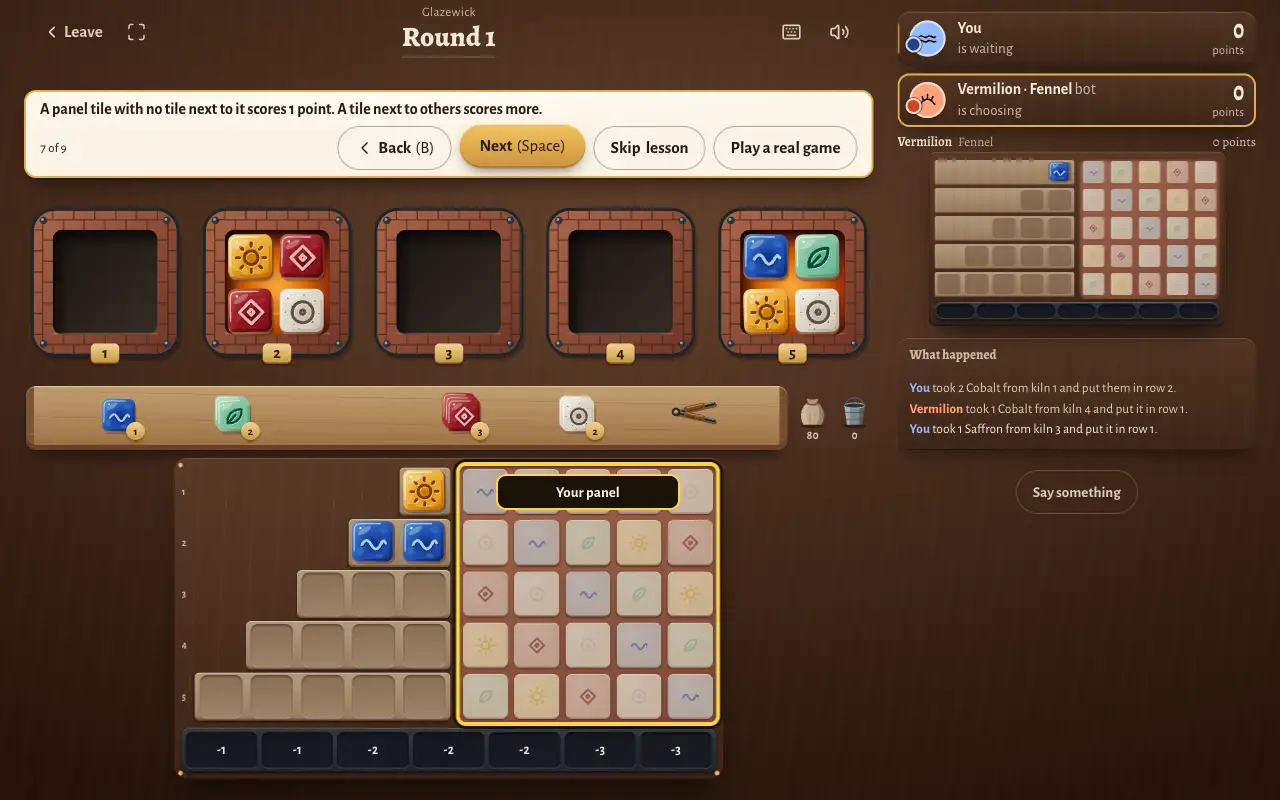
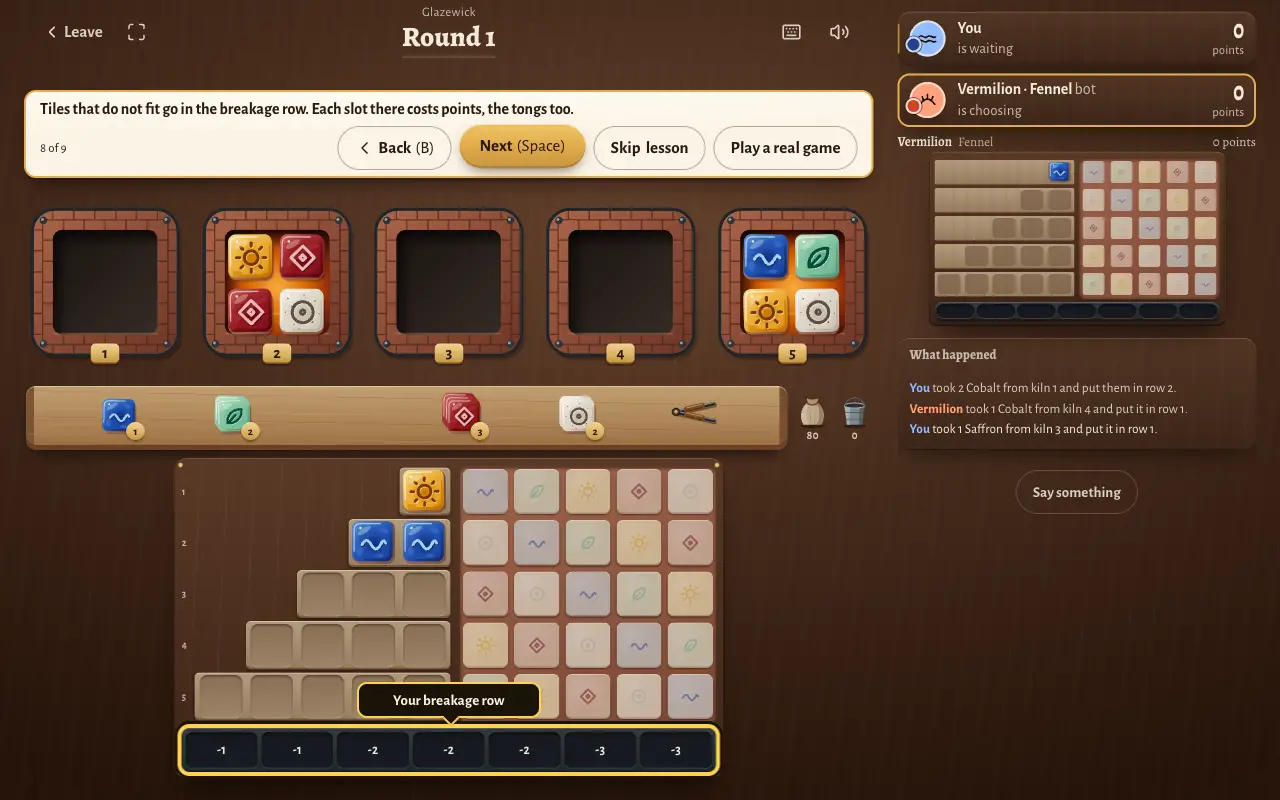
Step 8: Check breakage. “Tiles that do not fit go in the breakage row. Each slot there costs points, the tongs too.”
Step 9: Keep playing. The coach suggests a move each turn, but you can choose any move.
These plain words map to the names used in Glazewick on Tavernly.
| Plain word | Glazewick's name |
|---|---|
| tile | glaze tile |
| display (a small group of 4 tiles) | kiln |
| centre pool | the shelf |
| staging row | drying row |
| scoring grid | the panel |
| penalty row | the breakage row |
| first-player marker | the tongs |
| bag | the clay bin |
The rules in two minutes
This is our version, Glazewick on Tavernly. The rules below cover taking tiles, filling drying rows, glazing and scoring. A round ends when the kilns and shelf are empty and glazing is complete. Use this recap to follow a game, including breakage, end bonuses and how ties are settled.
The goal. Take tiles, fill drying rows, and place tiles on your panel to score. Each round has taking in turn order, then glazing for everyone at once. The player with the most points wins after the end bonuses.
Setup. There are 100 glaze tiles, 20 of each colour: Cobalt, Celadon, Saffron, Oxblood and Ash. They start in the clay bin. Use 5 kilns for 2 players, 7 for 3, or 9 for 4. Each round, each kiln gets 4 tiles. If the bin runs out, mix the discard pile back in. The shelf starts empty, with the tongs on it. Bots fill empty seats.
A turn. Choose a kiln or the shelf, then take every tile of one colour from it. When you take from a kiln, its other tiles move to the shelf. Put your take into one drying row, with any excess going to the breakage row. You can also send the whole take to breakage on purpose.
The tongs. The first player to take from the shelf also takes the tongs. They count as one broken piece, and that player starts the next round.
Drying rows. You have 5 rows: row 1 holds 1 tile, row 2 holds 2, up to row 5, which holds 5. Each holds one colour only. A chosen row must have room and be empty or already hold your colour. It cannot accept a colour already placed in the same row of your panel.
Glazing. Taking ends when every kiln and the shelf are empty. Work from drying row 1 down to row 5. Each full row sends its right-most tile to the matching colour cell in the same panel row; discard its other tiles. Unfilled rows wait for the next round. The panel is 5 by 5, with each colour once in every row and column.
Scoring. Score each tile as it reaches the panel. Neighbours count left, right, above and below. Bonuses are added at the end.
| What scores | Points |
|---|---|
| Placed tile | 1 if it has no neighbour. Otherwise, add the length of its unbroken line across, if 2 or more, and its unbroken line down, if 2 or more |
| Breakage slots | Lose 1, 1, 2, 2, 2, 3 and 3 points for filled slots, in order |
| Row bonus | 2 for each complete panel row |
| Column bonus | 7 for each complete panel column |
| Colour bonus | 10 for each colour with all 5 tiles on the panel |
Breakage. After glazing, subtract the points for filled breakage slots. The score never falls below 0. There are 7 slots; tiles arriving after all 7 are full are discarded without further cost.
The end. Finish the round in which any player completes a panel row of 5 tiles, then add bonuses. Most points wins. A tie goes to the player with more complete rows. If that is still tied, the players share the place.
Open information. Everything on the table is open. Only the order of the clay bin is hidden.
Rules differ between games, so for the original the rulebook in its box decides.
Tips for your first game
In Glazewick on Tavernly, check your drying rows and panel before you take a colour. A full drying row places a tile at glazing; spare tiles can cost points in the breakage row. These tips follow those rules, including what the tongs do and when the game ends.
- Count the space. You take every tile of your chosen colour from a kiln or the shelf. Check how many fit in one drying row before choosing.
- Check the panel too. A drying row cannot take a colour already placed in the same panel row.
- Build beside placed tiles. A tile without neighbours scores 1 point. Connected tiles score through their unbroken lines across and down.
- Weigh the tongs. Taking them lets you start the next round, but they also fill a breakage slot and cost points.
- Watch complete rows. Completing a panel row ends the game after that round. Check the row, column and colour bonuses before your final takes.
Questions people ask
You can play Azul in your browser through Board Game Arena, which lists a tutorial and both real-time and turn-based play. Glazewick on Tavernly offers its own game with bots, private tables and no account. The answers below distinguish the listed Azul options from the features we checked in our own game.
Can I play Azul online for free?
Board Game Arena hosts Azul in the browser: free to join, hosting may need Premium. Check the current terms before you host. Glazewick on Tavernly is free, with no account needed. It offers its own tile-drafting game, including private tables for friends and games against bots.
Do I need to download anything?
Azul on Board Game Arena runs in the browser with no download. Board Game Arena also has a Google Play app whose listing names Azul. Glazewick on Tavernly needs no download either: open its page in the browser and choose Play now, Learn by playing or Play with friends.
Can I play Azul alone against the computer?
For computer opponents, choose Glazewick on Tavernly, our own tile-drafting game. You can pick 1, 2 or 3 opponents and Easy, Medium or Hard bots. Bots take empty seats within five seconds. We did not verify bots or solo play for Azul on Board Game Arena.
How do I play Azul with friends online?
For Azul, open its Board Game Arena page, create a free account or sign in, check hosting terms, and join or host a table. For Glazewick on Tavernly, press Play with friends, choose the seats and Open a private table. Share invite gives you a link; friends join without an account.
Can I play Azul on my phone?
For Azul, Board Game Arena has a Google Play app whose listing names the game. Glazewick on Tavernly runs in a phone browser. At 390 pixels wide, its kilns, shelf, drying rows, panel and breakage row fit on one screen without zoom. History and Players (P) sit at the bottom.
How many people can play Azul?
Azul is for 2 to 4 players, according to the Spiel des Jahres page. Board Game Arena lists 2, 3 or 4 players for Azul. Glazewick on Tavernly also supports 2 to 4 players. Its private tables default to 4 seats, and bots take any seats that stay empty.
How long does a game of Azul take?
The Spiel des Jahres page gives about 45 minutes for Azul. Board Game Arena lists an average of 11 minutes for its Azul games. Glazewick on Tavernly takes about 15 minutes. Those figures describe different settings; Glazewick on Tavernly also has a 60-second timer for each decision.
Sources
These sources were checked on 7 October 2026. The store searches covered Steam, the US App Store and Google Play. We did not verify Board Game Arena hosting terms while logged in, bots or solo play on BGA, or a BGA app on the App Store.
- Spiel des Jahres e.V., “Azul”: designer, publisher, players, age and time.
- Wikipedia, “Spiel des Jahres”: 2018 Game of the Year.
- Wikipedia, “Azul (board game)”: 2017 release by Plan B Games.
- Board Game Arena, Azul: players, average time, tutorial, real-time and turn-based play, games played and Premium game status.
- Google Play, Board Game Arena: listing summary.
- Glazewick on Tavernly: play options, private tables, lesson, phone view and game limits.
Glazewick is not affiliated with or endorsed by the owner of Azul. Azul is a trademark of its owner. As an Amazon Associate we earn from qualifying purchases. If you want the physical game, here is Azul on Amazon.